Feature Guide
BlueKing Lite CMDB is built around four core scenarios: "Model Management -> Asset Management -> Discovery & Sync -> Subscription & Notification," providing full-stack asset configuration management capabilities. This document breaks down each feature by product navigation module.
1. Model Management
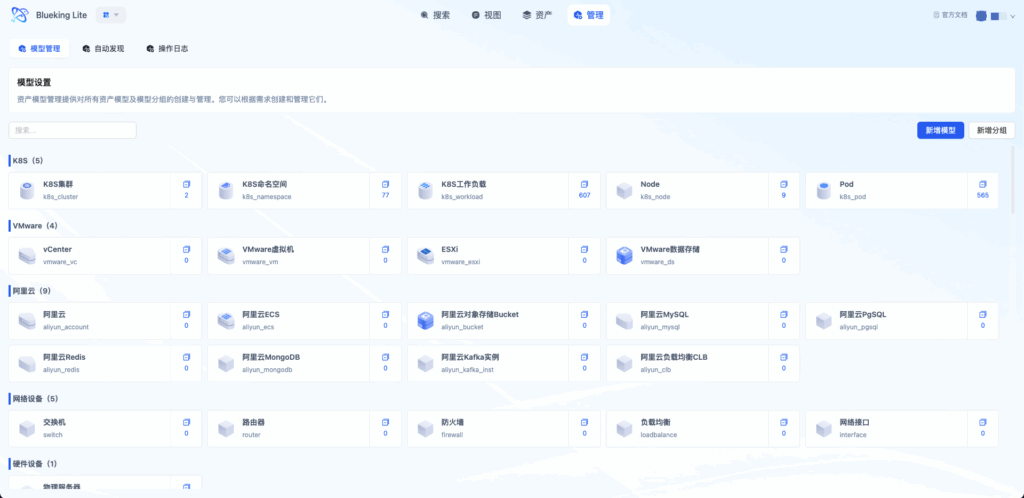
Model Management is the data rule engine of BlueKing Lite CMDB, determining how assets are defined, displayed, and related. All instance operations are governed by model constraints, serving as the foundation for ensuring asset data consistency.
UI Guide:
- Diagram explanation: The Model Management page uses a three-level navigation layout. The left panel displays a category tree with drag-and-drop sorting; the center shows model cards with instance statistics and operation entry points; the right detail panel organizes configuration modules such as "Attributes," "Groups," and "Relationships" through tabs.
1.1 Model Categories and Model Definition
Core Purpose: Establish an organizational hierarchy for assets, enabling large-scale asset classification management.
Core Capabilities
- Category-based organization: Supports building multi-level categories by business domain, resource type, or management boundary; category order supports drag-and-drop adjustment
- Standardized model definition: Maintains attributes, relationships, and display rules at the model level, ensuring consistency across same-type assets
- Model duplication and reuse: One-click duplication of an existing model's attributes, field groups, and relationship configurations, supporting cross-category reuse to significantly reduce standard model expansion time
- Organization scope isolation: Models are bound to organization scope, enabling data boundary management when multiple teams share the platform
- Admin layout mode: Super administrators can enter "Management Sorting" mode to perform global visibility toggling (show/hide) and drag-and-drop sorting of categories and models; regular users see only displayed categories and models, with layout changes taking effect immediately
Typical Usage
Enterprises can first create top-level categories such as "Infrastructure," "Business Applications," and "Network Devices," then refine them with sub-models, such as "Physical Machines," "Virtual Machines," and "Container Nodes" under Infrastructure.
1.2 Attribute Management
Core Purpose: Define asset data structures, including field types, constraint rules, and display methods.
Core Capabilities
- Ten attribute types: Supports string, integer, enumeration, datetime, user, organization, boolean, password, tag, and table, covering 99% of asset modeling scenarios
- Flexible enumeration rules: Enumeration fields support "single-select/multi-select" modes, can reference the public option library for cross-model unification, or directly configure custom options
- Field-level constraints: Three constraint levels -- required, unique, and editable -- ensure data quality; password-type fields are automatically encrypted for storage with masked API responses
Attribute Type Quick Reference
| Type | Use Case | Special Capability |
|---|---|---|
| String | Names, IPs, serial numbers, and other text | Supports regex validation |
| Integer | Port numbers, capacity sizes, and other numeric values | Supports range constraints |
| Enumeration | Status, environment, level, and other fixed options | Supports public option library references |
| Datetime | Creation time, expiration time, etc. | Supports both date and datetime precision |
| User | Owner, creator, and other personnel | Auto-links to user system, displays user names |
| Organization | Department, team, etc. | Auto-links to organization tree, supports hierarchical display |
| Boolean | Is core, is monitored, etc. | Toggle switch display |
| Password | Account passwords, keys, etc. | Encrypted storage, masked display throughout |
| Tag | Flexible categorization, multi-dimensional labeling | Supports key-value pair format, e.g., env:prod |
| Table | NIC lists, disk lists, and other complex structures | JSON storage, frontend table rendering |
1.3 Field Groups and Display Structure
Core Purpose: Optimize the data entry and viewing experience for complex models, avoiding long flat forms.
Core Capabilities
- Group-level organization: Supports creating, editing, and deleting field groups to organize fields by business logic (e.g., "Basic Information," "Network Configuration," "Operations Attributes")
- Group ordering and collapse: Controls group display order and sets default collapse/expand states to accommodate different reading preferences
- Cross-group attribute adjustment: Supports moving attributes from one group to another, flexibly adjusting the display structure
- Instance-level rendering: Field group configurations take effect immediately on instance creation, editing, and detail pages
1.4 Model Relationship Management
Core Purpose: Define the association rules between assets, serving as the foundation for topology and impact analysis.
Core Capabilities
- Six relationship types: Belongs to, composed of, runs on, installed on, contains, and associated with, covering mainstream dependency scenarios
- Four mapping constraints: Supports 1:1, 1:n, n:1, and n:n mapping relationships, preventing arbitrary associations from distorting structure
- Bidirectional structure expression: Relationship definitions simultaneously constrain the association capabilities of source and target model instances
- Native graph relationship storage: Model relationships are stored as graph edges in FalkorDB, natively supporting multi-hop topology queries
Relationship Type Use Cases
| Relationship Type | Direction | Typical Scenario | Example |
|---|---|---|---|
| Belongs to | Child -> Parent | Asset ownership | VM belongs to host |
| Composed of | Parent -> Child | Whole and parts | Host is composed of cluster |
| Runs on | App -> Resource | Deployment location | Service runs on container |
| Installed on | Software -> Hardware | Software deployment | MySQL installed on Linux host |
| Contains | Parent -> Child | Hierarchical containment | VPC contains subnet |
| Associated with | Bidirectional | Peer association | Switch A associated with Switch B |
2. Asset Management
Asset Management revolves around the full instance lifecycle, covering the complete chain of creation, modification, import/export, relationship maintenance, detail viewing, and change tracking.
2.1 Instance Creation and Maintenance
Core Purpose: Provides both single-item precise maintenance and batch efficient operation modes to accommodate different maintenance scenarios.
Core Capabilities
- Single-item precise maintenance: Form-based entry following model definitions, real-time field-level validation feedback, suitable for fine-grained management of critical assets
- Batch deletion: Supports batch deletion by selecting instances or by filter conditions, with secondary confirmation before execution
- Inline list editing: Some fields support quick editing directly on the list page without entering the detail page
- Automatic organization inheritance: Instances automatically inherit the model's default organization, with manual adjustment supported
UI Guide:
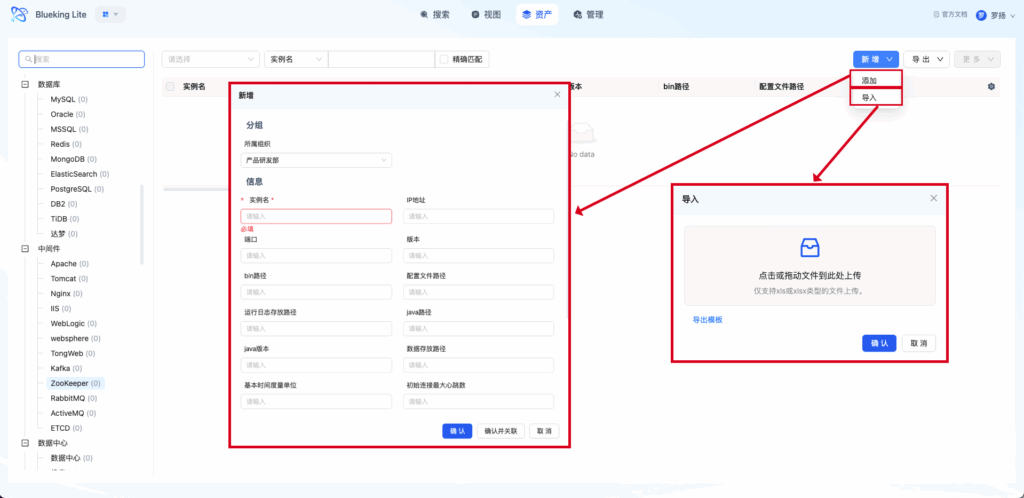
- Diagram explanation: The asset list page has a filter bar at the top supporting multi-condition combination filtering; the left panel shows a model navigation tree for quick switching; the center table displays instance data with adjustable column widths; the top-right corner provides import, export, and batch operation entry points.
2.2 Import and Export
Core Purpose: Enable data exchange between CMDB and external systems, supporting initial migration and periodic inventory.
Core Capabilities
- Excel batch import: Auto-generates import templates with automatic field-to-model-attribute mapping, supporting data pre-validation and error prompts
- Field-level export control: Allows selecting export fields on demand, supporting "export display fields only" or "export all fields"
- Relationship export and import: Supports exporting instance relationships along with instances, preserving structural information
- Asynchronous large batch processing: Large-volume import/export uses asynchronous tasks, supporting progress tracking and result downloads
Model Configuration Export (with Model Selection)
"Export Model Configuration" supports selecting a subset of models to export using a category-based collapsible tree, rather than always exporting everything:
| Export Scope | Rules |
|---|---|
| Model Definition and Attributes | Only export selected models |
| Categories | Only export categories of selected models |
| Public Enumeration Library | Always export in full |
| Model Relationships | Only retain relationships where both endpoints are selected; cross-selection relationships are automatically discarded |
Note: When exporting without selecting any models, the behavior is identical to the original full export, and does not affect the "Export Template" functionality in the import dialog.
2.3 Relationship Maintenance
Core Purpose: Establish real dependency connections at the instance level, supporting topology analysis and impact assessment.
Core Capabilities
- Model-based relationship creation: Instance associations must be based on predefined model relationships, preventing arbitrary connections
- Association conflict detection: Automatically validates mapping constraints (e.g., prompts when 1:n relationship limits are exceeded)
- Batch association operations: Supports establishing the same type of association for multiple instances simultaneously
- Cascading removal capability: Option to synchronously clean up related data when removing associations
2.4 Instance Details and Topology
Core Purpose: Provides a 360-degree view of a single instance, integrating attributes, relationships, and changes in one place.
Core Capabilities
- Multi-tab organization: Basic information, relationships, and change records are displayed in separate tabs for clear information structure
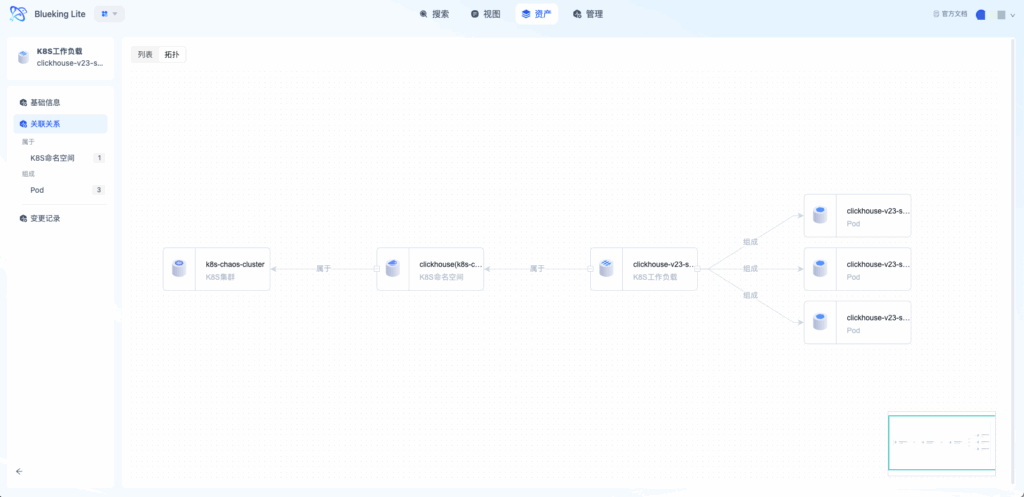
- Topology visualization: Real-time rendering based on the graph database, supporting layer-by-layer expansion, node extension, and path tracing
- Topology interactive operations: Supports box selection, drag-and-drop, zoom, node click-through to details, and right-click context menus
- Impact scope analysis: Centered on the target instance, traces dependencies upstream and views dependents downstream
- Network topology tab (exclusive to network device models): The relationship tab of network device instances includes a "Network Topology" tab showing the actual network topology with devices as nodes and direct interface connections as edges. Click on peer devices to expand layer-by-layer; multi-hop data is automatically deduplicated and merged.
- Rack view (exclusive to rack model): The relationship tab of rack instances provides a "Rack View" tab displaying devices in the rack with an upright U-position diagram, supporting click-through to device details. Overlapping or out-of-bounds U positions are highlighted as alerts.
- Server room view (exclusive to server_room model): The relationship tab of server room instances provides a "Server Room View" tab displaying rack positions in a top-down floor plan arranged in row/column grids, with racks color-coded by type showing U count and names. Click a rack to drill down to the rack view. Unpositioned and misaligned racks are shown with alert indicators.
Server Room/Rack View Prerequisites
To enable server room and rack views, configure the following fields in the model:
| Model | Field | Meaning |
|---|---|---|
rack (Rack) | row (Integer) | Rack row number |
rack (Rack) | col (Integer) | Rack column number |
| Network devices (switch/router/firewall, etc.) | rack_u_start (Integer) | Starting U position in rack |
| Network devices (switch/router/firewall, etc.) | u_size (Integer) | Number of U positions occupied |
Note: Racks with empty
row/colare listed as "Unpositioned" in the server room floor plan and displayed with alerts; devices with emptyrack_u_start/u_sizeare similarly listed as "Unallocated U positions."
UI Guide:
- Diagram explanation: The topology view uses a force-directed graph layout, with different models identified by different colors and line thickness reflecting relationship strength. The left toolbar provides layout switching, hierarchy control, image export, and other functions.
3. Asset View and Full-Text Search
As asset scale grows, quick location becomes a core requirement. BlueKing Lite CMDB addresses this through dual entry points: "Global View + Precise Search."
3.1 Asset View
Core Purpose: Provides a macro overview of assets to help build global awareness.
Core Capabilities
- Category-level aggregate display: Summarizes instance counts by model category in a card-based layout for quick overview
- Model-level statistics drill-through: Click a category to expand the model list, showing the instance count for each model
- Keyword quick filtering: Supports real-time filtering by model name to quickly narrow the browsing scope
- One-click drill-down to list: Navigate directly from view cards to the corresponding model's instance list for seamless operations
3.2 Full-Text Search
Core Purpose: Provides cross-model precise search capabilities, supporting complex condition combinations.
Core Capabilities
- Multi-dimensional keyword matching: Supports matching across multiple fields including instance name, IP, tags, and attribute values
- Model-level result aggregation: Search results are first grouped and counted by model, then show specific instances, suitable for multi-model environments
- Case sensitivity toggle: Supports exact match scenarios (e.g., case-sensitive identifiers)
- Local search history: Automatically saves recent search records, supporting one-click recall
- Search result preview: Hover over an instance to quickly preview key attributes without navigating to the detail page
Field-Level Searchable Scope
Different field types exhibit different search matching behaviors in full-text search:
| Field Type | Searchable Content | Not Searchable |
|---|---|---|
| Attachment / Image (File Type) | File name stem (directory path removed, extension removed from the main part) | File URL, size, ID, and other raw metadata |
| Password (pwd) | Not searchable (encrypted field, intentionally excluded from full-text search) | — |
| Other fields (string, enumeration, tags, etc.) | Actual field value | — |
Note: Attachment/Image fields establish search indices only on file name stems, allowing quick asset location via uploaded file names; Password fields are encrypted and excluded from all search indices for security, so no keywords can match password field content.
UI Guide:
- Diagram explanation: The full-text search page has a search box and advanced filter entry at the top; the left panel shows model-level statistics (e.g., "Hosts: 12 results," "Databases: 5 results"); the right panel shows instance lists with pagination and sorting; click an instance title to enter the detail page.
UI Guide:
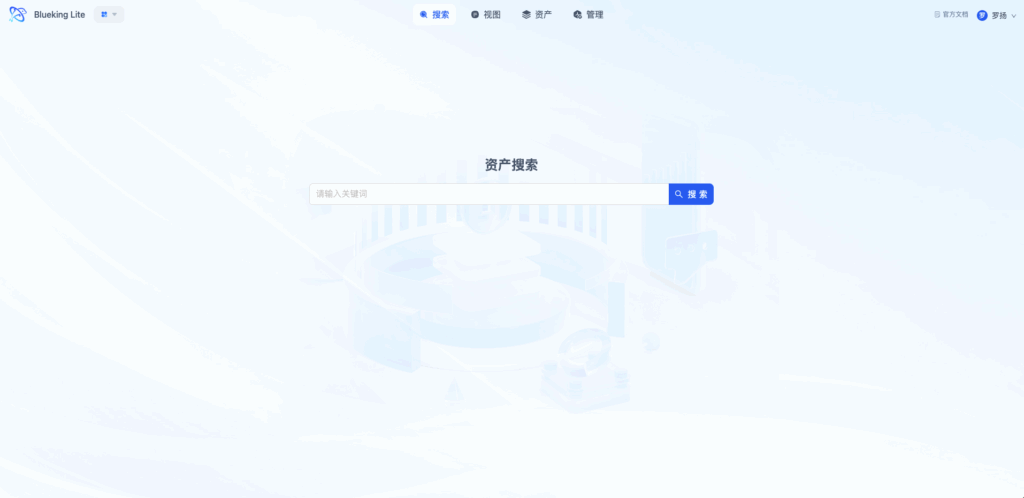
- Diagram explanation: The full-text search page has a search box and advanced filter entry at the top; the left panel shows model-level statistics (e.g., "Hosts: 12 results," "Databases: 5 results"); the right panel shows instance lists with pagination and sorting; click an instance title to enter the detail page.
4. Auto Discovery and Collection Tasks
Auto discovery is the core mechanism for maintaining data freshness, using professional plugins spanning containers, virtualization, network devices, databases, storage, cloud platforms, and middleware to automatically manage K8s, cloud resources, network devices, databases, storage devices, and other objects.
4.1 Collection Objects and Scope
Core Purpose: Organize discovery capabilities in a collection object tree to lower the task configuration barrier.
Core Capabilities
- Broad object-domain coverage: Containers (K8s/Docker), virtualization (VMware vCenter), network devices (SNMP), databases, storage devices, cloud platforms, and middleware
- Object-level plugin documentation: Each collection object provides detailed configuration guides and prerequisites
- Adaptive driver types: Protocol collection (Protocol) interfaces with API/SNMP; script collection (Job) executes via SSH/Agent
- Configuration file collection: Beyond asset inventories, the platform can collect the configuration file contents of target objects; the collector returns them and they are archived by version, supporting configuration baseline management and change tracing
Note: Collection objects marked BETA are in trial stage. We recommend validating them in a non-production environment before adding them to production scans.
Supported Collection Objects
| Object Domain | Specific Objects | Driver Type | Relationship Recovery |
|---|---|---|---|
| Container | K8s cluster, Docker | Protocol | Cluster -> Namespace -> Workload -> Pod -> Node |
| Virtualization | VMware vCenter | Protocol | vCenter -> Cluster -> Host -> VM |
| Network Devices | Switches, routers (SNMP) | Protocol | Device -> Interface -> Connection relationships |
| Database | MySQL, PostgreSQL, Redis, MongoDB, Elasticsearch, HBase, InfluxDB (BETA), MSSQL (BETA) | Protocol / Job | Instance -> Database -> Table |
| Storage Devices | Huawei OceanStor (BETA) | Protocol | Storage device -> Storage pool -> Disk/Volume (LUN) |
| Cloud Platform | Alibaba Cloud, Tencent Cloud, Huawei Cloud (BETA), FusionInsight (BETA) | Protocol | Huawei Cloud: Account -> VPC -> Subnet -> ECS/EVS/OBS/EIP/SG/ELB/RDS/DCS; Others: VPC -> Subnet -> Instance -> Security Group |
| Host | Linux, Windows | Job | Host -> Process -> Port |
| Middleware | Nginx, Kafka, Zookeeper, RabbitMQ, Tomcat | Job | Instance |
4.2 Collection Task Configuration
Core Purpose: Provides flexible task orchestration capabilities to accommodate different network environments and security requirements.
Core Capabilities
- Periodic execution strategy: Periodic scans to keep data fresh
- Multi-dimensional scope control: Supports defining collection scope by access point, IP range, or instance list
- Secure credential management: Accounts and passwords are encrypted for storage, supporting key pair authentication, with masked API responses
- Granular timeout control: Supports separate configuration for global timeout and per-object timeout to adapt to heterogeneous network environments
4.3 Execution Results
Core Purpose: Provides transparent display of collection results.
Core Capabilities
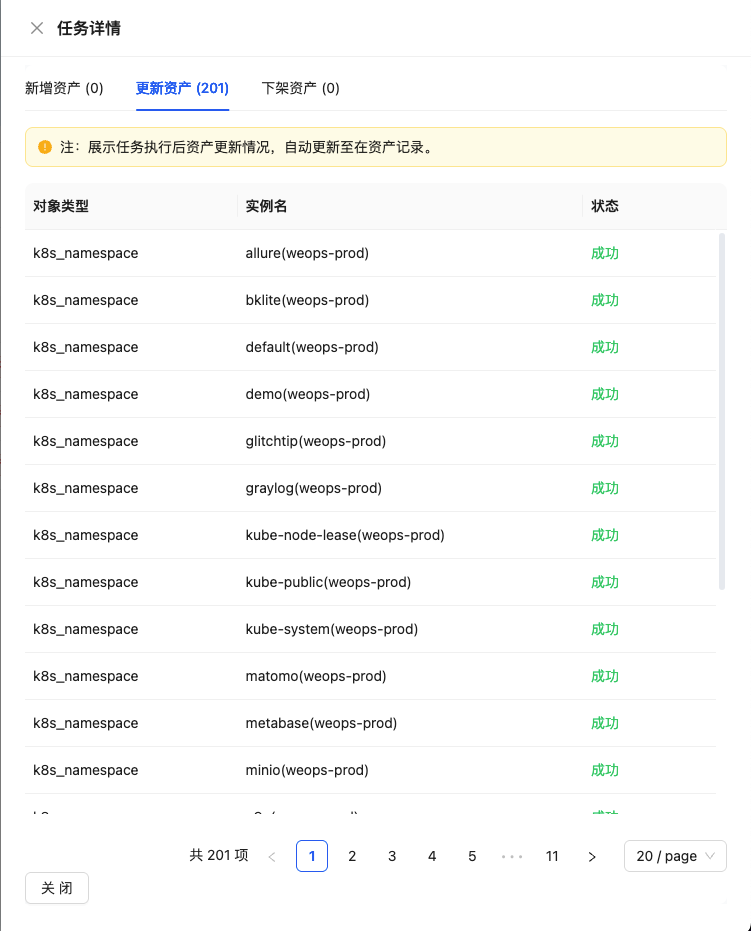
- Five-dimensional result summary: Each task outputs categorized statistics for "Added, Updated, Deleted, Associated, and Exceptions," enabling quick assessment of task impact
- Detail data traceability: Supports viewing formatted structured data and raw collection data
- Automatic exception fallback: Long-running tasks are automatically marked as exceptions, preventing task status from hanging
UI Guide:
- Diagram explanation: The task detail page shows basic task information and execution status at the top; the center displays the five-dimensional result summary in card format with color-coded numbers (green for added, blue for updated, red for deleted, orange for exceptions); the bottom allows switching between "Instance Details," "Raw Data," and "Execution Logs."
4.4 Scenario-Specific Deep Discovery
BlueKing Lite CMDB goes beyond collecting object inventories to recovering object relationships.
K8s Resource Relationship Recovery
- Layered resource discovery: Automatically identifies clusters, namespaces, Deployments, StatefulSets, DaemonSets, Pods, and Nodes
- Automatic hierarchy completion: Namespaces belong to clusters, Pods run on Nodes, Pods belong to workloads
- Workload tracing: Traces back to the parent workload type through ReplicaSets
- Service dependency mapping: Collects Service-to-Pod Label Selector relationships
Network Device Topology Discovery
- SOID intelligent identification: Maps device model, brand, and type based on sysObjectID (built-in common vendor signature database)
- Interface-level collection: Collects interface name, IP, MAC, status, speed, and other detailed information
- Connection relationship inference: Combines ARP tables, MAC address tables, and interface information to infer inter-interface connections
- Topology visualization: Generates topology diagrams approximating real network structures
- Manual topology adjustment: In the "Network Topology" tab's edit mode within instance details, you can manually add/delete interface-to-interface connection relationships between devices, or drag network devices from outside the canvas and connect them. Write operations are isomorphic with collection, using interface instances as connection endpoints.
Huawei Cloud Sub-resource Deep Discovery (Beta)
The Huawei Cloud collection plugin, beyond cloud servers (ECS), can automatically discover and manage the following sub-resource types:
| Sub-resource Type | Description |
|---|---|
| Block Storage (EVS) | Cloud disks, collecting disk size, type, availability zone, billing method, etc. |
| Object Storage (OBS) | Buckets, collecting bucket type, region, etc. |
| VPC | Virtual private cloud, collecting CIDR, status, whether default VPC, etc. |
| Subnet | Collecting CIDR, gateway, availability zone, etc.; automatically associates to parent VPC |
| Elastic Public IP (EIP) | Collecting public IP, bandwidth, billing method, status, etc. |
| Security Group (SG) | Collecting security group name, whether default security group, etc. |
| Load Balancer (ELB) | Collecting status, IP version, billing method, etc. |
| Distributed Cache (DCS) | Cache instances, collecting engine and version, capacity, port, cache mode, etc. |
| Relational Database (RDS) | Collecting database type, engine version, specification, storage size, port, etc. |
Independent collection per sub-resource: Each sub-resource type is collected independently within a single task. Failure to collect one sub-resource type (e.g., the account hasn't enabled DCS) will not interrupt data updates for other sub-resources; successfully collected resources are stored normally.
5. Public Option Library and Personal Settings
5.1 Public Option Library
Core Purpose: Unified management of enumeration options reused across models, reducing repetitive maintenance costs.
Core Capabilities
- Cross-model reuse: Unified management of enumeration values for status, level, environment, type, etc., directly referenced by multiple model attributes
- Reference validation: Automatically checks references before deleting an option library, preventing data anomalies from accidental deletion
- Real-time sync refresh: When an option library is updated, model attributes referencing it are automatically synchronized for consistency
- Versioned management: Option change history is traceable, supporting rollback to historical versions
5.2 Personal Settings
Core Purpose: Supports user-level personalization, allowing different roles to view assets from their most suitable perspective.
Core Capabilities
- Custom display fields: Each user can save their preferred list display fields per model
- Saved frequent filters: Supports saving frequently used filter conditions for one-click access
- Cross-device sync: Personal settings are bound to user accounts and automatically restored when logging in from a different device
- Role-based views: Asset administrators focus on structural integrity, operations engineers focus on status and responsible persons, each getting what they need
6. Data Subscription and Change Notifications
Data subscription upgrades the CMDB from "passive queries" to "proactive push" capabilities.
6.1 Subscription Rule Management
Core Purpose: Configure subscription rules per model to define "under what circumstances to notify whom."
Core Capabilities
- Dual-mode instance filtering: Supports "dynamic filtering by conditions" or "directly specifying instances" to define the scope of interest
- Three trigger types:
- Attribute change: Triggers when a specified field changes
- Relationship change: Triggers when associations are added, deleted, or their attributes change
- Expiration reminder: Triggers when a specified datetime field approaches its deadline (e.g., 30 days before certificate expiration)
- Organization-level rule isolation: Subscription rules are managed by their owning organization; only members of the same organization can operate them
6.2 Trigger Detection and Event Merging
Core Purpose: Intelligent change detection, preventing message flooding.
Core Capabilities
- Incremental window detection: Based on ChangeRecord incremental comparison, only detects new changes since the last check
- Event merge and noise reduction: Multiple attribute changes to the same instance are merged into a single notification, with a summary showing all changed fields
- Snapshot mechanism: Maintains rule snapshots to support before/after state comparison for precise change identification
- Deduplication key mechanism: Expiration reminders use "instance + field + date" deduplication keys to avoid duplicate notifications
6.3 Notification Channels and Recipient Management
Core Purpose: Push subscription events to users' preferred work channels.
Core Capabilities
- Multi-channel notifications: Supports in-app messages, WeCom (WeChat Work), DingTalk, email, and other notification channels
- Flexible recipient configuration: Can specify specific users, user groups, or roles as recipients
- Custom notification templates: Supports customizing notification content templates including instance information and change details
- Notification history query: View notification delivery records and delivery status
7. Permission Rules and Change Records
7.1 Permission Rules
Core Purpose: Organization-based data isolation to ensure multi-team collaboration security.
Core Capabilities
- Organization-level visibility scope: Visibility of models, instances, and collection tasks can be configured by organization scope
- Object-level operation permissions: Supports fine-grained operation permission controls including create, edit, delete, and manage
- Default organization fallback: Resources without a specified organization default to the default organization, facilitating platform initialization
- Permission inheritance: Child organizations automatically inherit parent organization permission configurations, reducing repetitive setup
7.2 Change Records
Core Purpose: Full lifecycle auditing to meet compliance requirements and support fault tracing.
Core Capabilities
- Complete operation audit trail: Records all operations including instance creation, modification, deletion, and relationship changes
- Change detail tracing: View before/after value comparisons for each change, down to the field level
- Time range filtering: Supports filtering change records by time period for auditing and troubleshooting
- Multi-dimensional filtering: Can filter by operator, operation type, change scenario, model, instance, and other dimensions
- Change export: Supports exporting change records based on current filter conditions, with a maximum of 50,000 rows per export
- Mirroring management changes to platform operation logs: Four categories of management-level changes (model management changes, auto-collection/automation changes, custom report changes, and relationship changes) are simultaneously mirrored to the platform-level operation log in addition to being written to the CMDB's own change records, providing unified audit traceability across modules; mirroring is best-effort and failures do not affect the normal writing of CMDB change records
- Alert operation log sync mirror: Alert module operation logs (creation, modification, deletion, execution, etc.) are similarly mirrored to the platform-level operation log through the same mechanism, achieving unified audit view for both CMDB and alerts
Change Scenario Description
Change scenarios comprise 6 categories, automatically determined by the system when changes occur, indicating "the business meaning of this change":
| Change Scenario | Trigger Source | Mirror to Platform Operation Log |
|---|---|---|
| Model management changes | Model attribute and relationship management operations | Yes |
| Auto-collection/automation changes | Collection tasks, auto-discovery writes | Yes |
| Custom report changes | External system API reports | Yes |
| Relationship changes | Instance relationship additions/deletions | Yes |
| Ordinary attribute changes | Manual instance attribute edits | No, retained only in CMDB's own change records |
| Equipment flow | Manual annotations during instance editing | No, retained only in CMDB's own change records |
Note: The change record list is focused on the instance perspective by default and does not display model management changes; if you need to view audit information related to model structures, you can manually add the "Model management changes" scenario to filter conditions, or view them in the platform operation log.
Important / Security Best Practices
For auto-discovery tasks, it is recommended to:
- Use Approval Before Write mode in production environments to prevent erroneous collection from directly entering the ledger
- Periodically review Change Records, paying attention to abnormal changes and unauthorized operations
- Periodically archive change records for sensitive models to meet long-term audit requirements