Core Features
Node Management covers eight core management capabilities: cloud regions, nodes, environments, variables, component library, controllers, collection configuration, and installation packages, supporting unified control of multi-cloud resources and collection components. The system fully supports Linux x86_64 / ARM64 dual-architecture controllers and collectors, with automatic architecture detection during installation and precise package distribution. Built-in credential masking and minimum-privilege security mechanisms are standard.
1. Cloud Region Management: Logical Grouping and Control of Node Resources
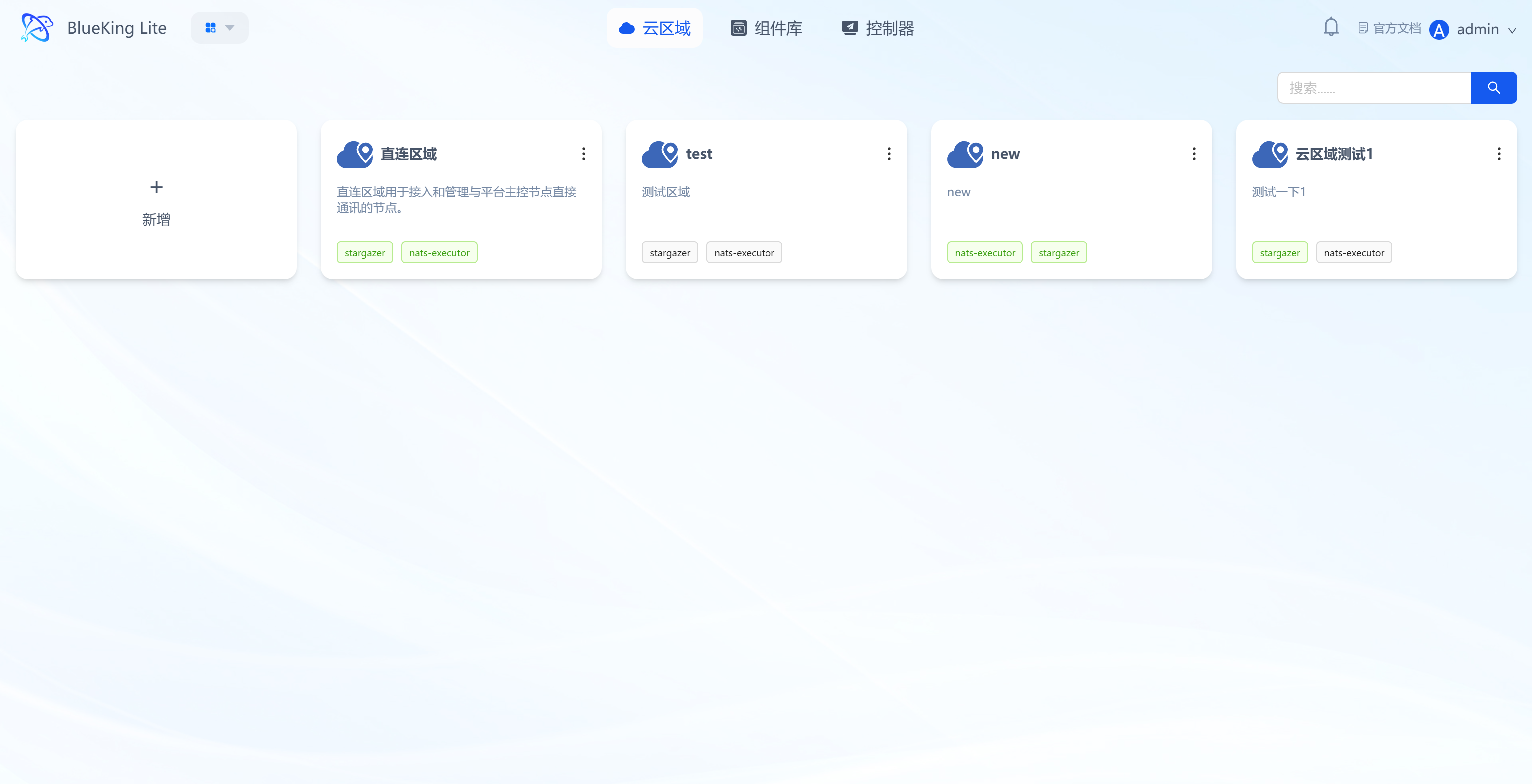
Cloud regions are the top-level logical grouping units for node resources, used to isolate node resources across different scenarios (e.g., production/testing) and enable domain-based resource management.
Core Features
- Region creation and information display: Supports creating cloud regions, with each region displaying its name, description, and associated communication components (e.g.,
stargazer,nats-executor); - Region component status indicators: Region cards visually indicate communication component status, providing quick awareness of the region's basic communication capabilities;
- Auto-guidance when the environment is undeployed: When a cloud region's base environment is not yet deployed, entering the region lands on the "Environment" page by default, prioritizing the build-out of the region's communication capabilities.
2. Node Management: Operational Control of Controller and Component Runtime Hosts
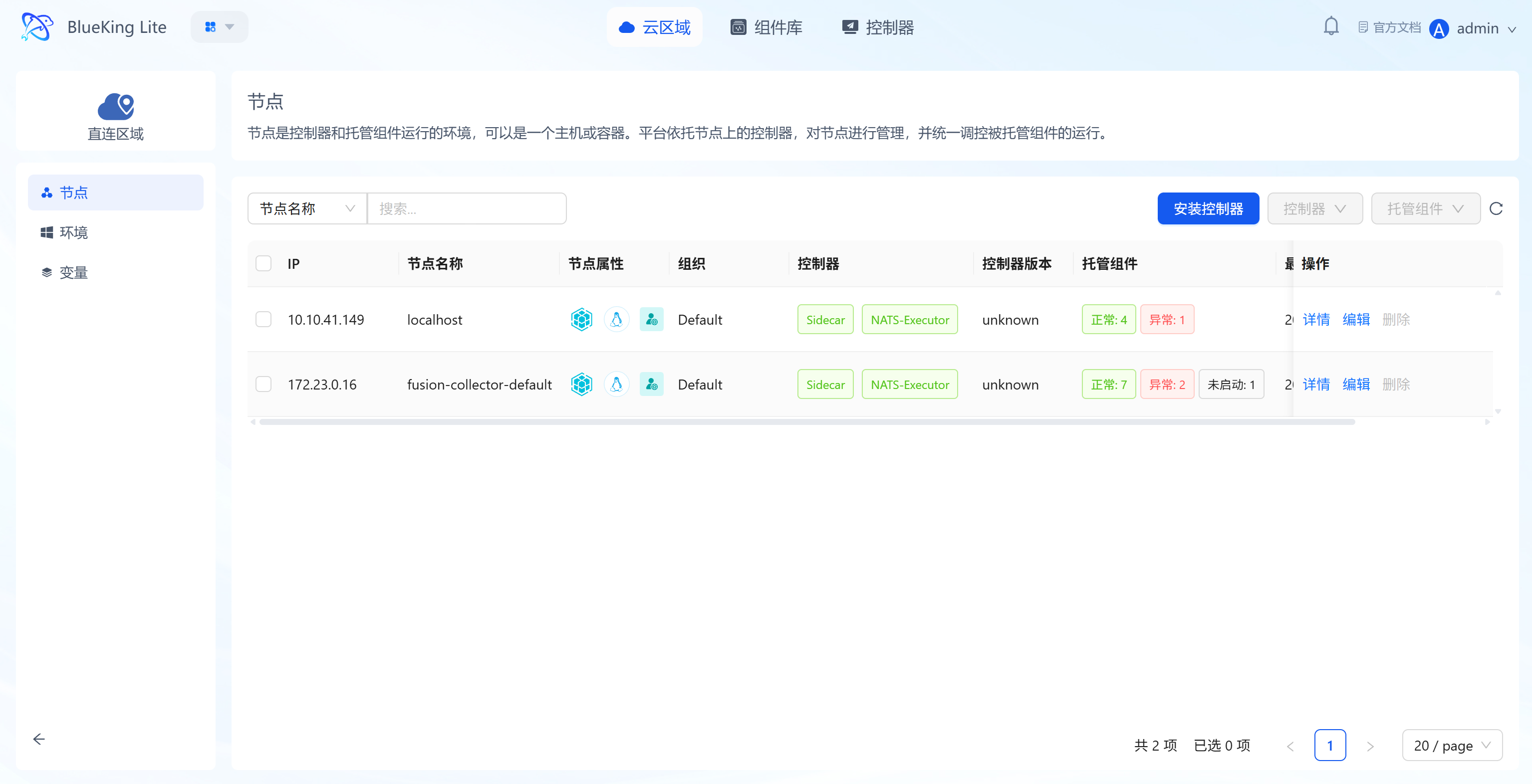
Nodes are the runtime entities (hosts/containers) for controllers and collection components, supporting full lifecycle operations including controller deployment and component hosting.
Core Features
- Controller installation and status monitoring: Supports batch installation of Linux (x86_64 / ARM64) / Windows controllers for nodes, with the list displaying controller runtime status and version information;
- CPU architecture auto-detection: Remote installation automatically detects target node CPU architecture via
uname -mand distributes the matching installer and controller package by OS + architecture. The nodecpu_architectureattribute is populated and persisted via Sidecar callback; - Full lifecycle hosted component operations: Supports install, start, restart, and stop operations for components on nodes, with per-node retry for failed tasks;
- Node information visualization: Displays node IP, name, owning organization, active status, controller status, hosted component status, installation method, node type, CPU architecture, and version information;
- Batch configuration distribution to nodes: Supports binding collection configurations to nodes in batch and running batch operations on the collectors on those nodes;
- Batch operation constraint validation: Batch collector operations require the selected nodes to share the same operating system and CPU architecture. If selected nodes have unknown architecture, the system blocks the operation with a prompt rather than returning ambiguous results silently.
3. Environment Management: Infrastructure Components for Cloud Region Communication
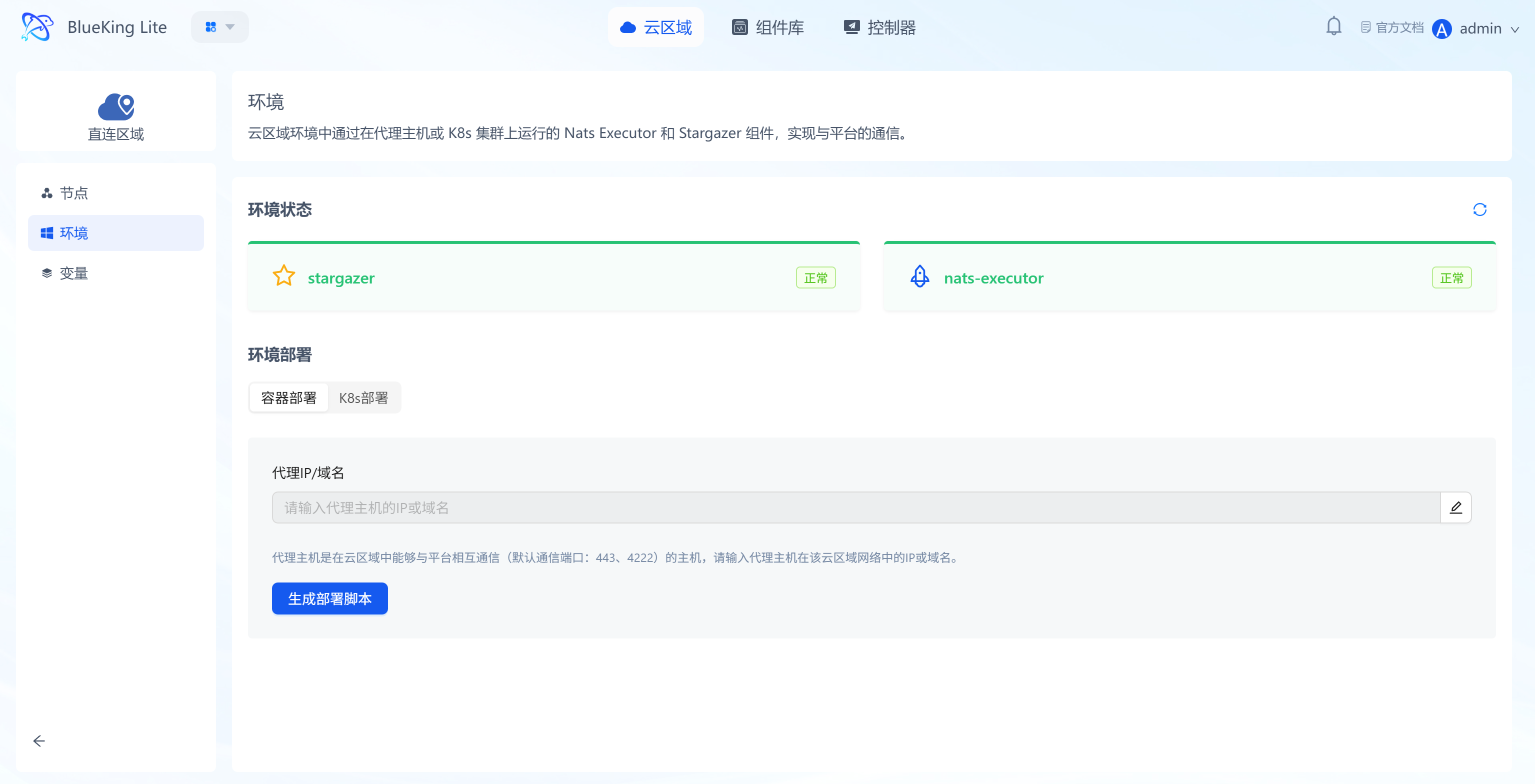
Environments are the supporting component sets for communication between cloud regions and the platform (e.g., stargazer, nats-executor), ensuring communication connectivity between nodes within a region and the platform.
Core Features
- Communication component status monitoring: Real-time display of the runtime status of core communication components such as
stargazerandnats-executor(e.g., "Normal"); - Environment deployment configuration: Supports generating a deployment script via container deployment and copying it to run; after entering the proxy IP/domain, the environment setup completes quickly;
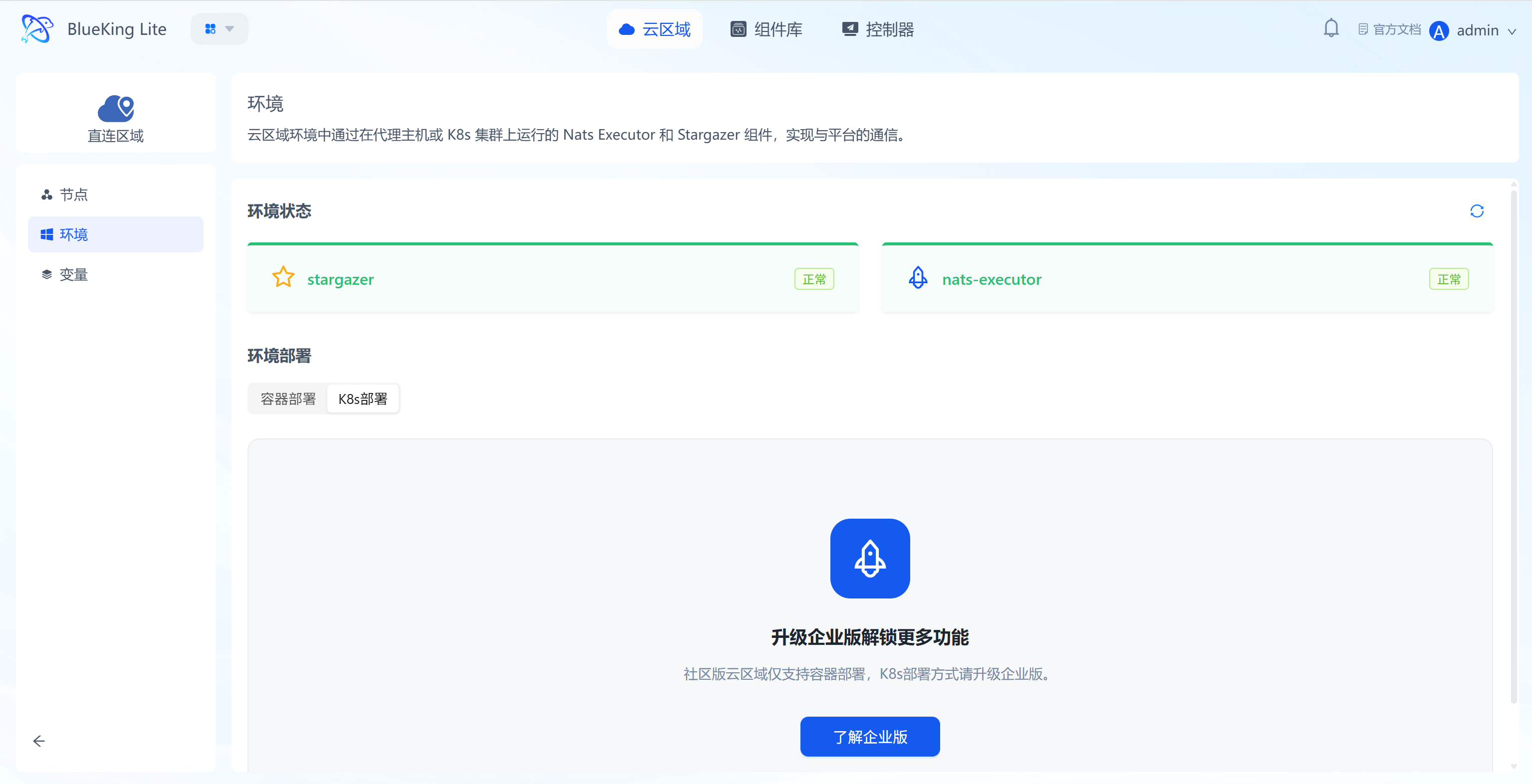
- K8s upgrade guidance: The Environment page provides a K8s entry point and upgrade guidance to handle subsequent upgrades of cluster environments.
4. Variable Management: Dynamic Unified Configuration Management
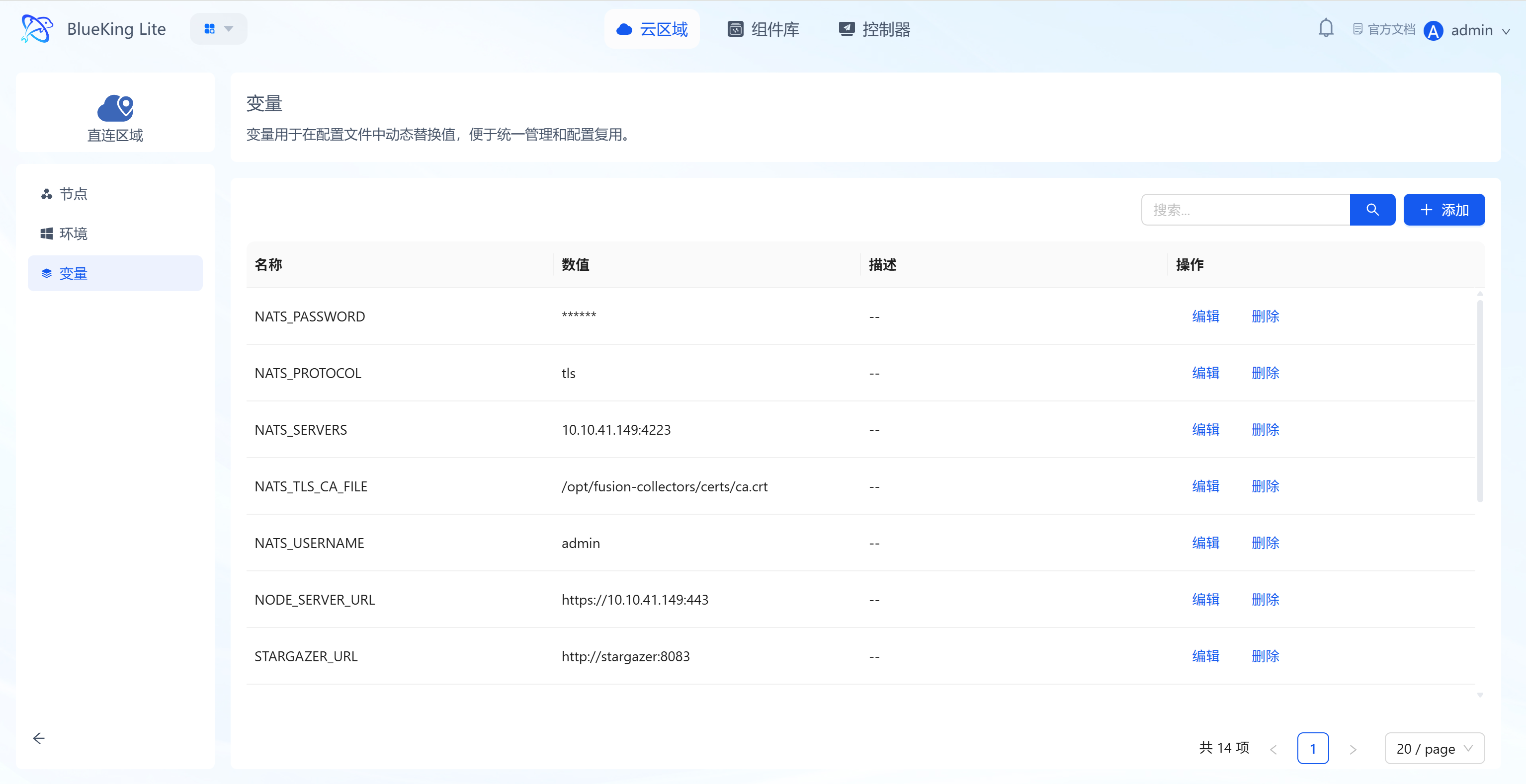
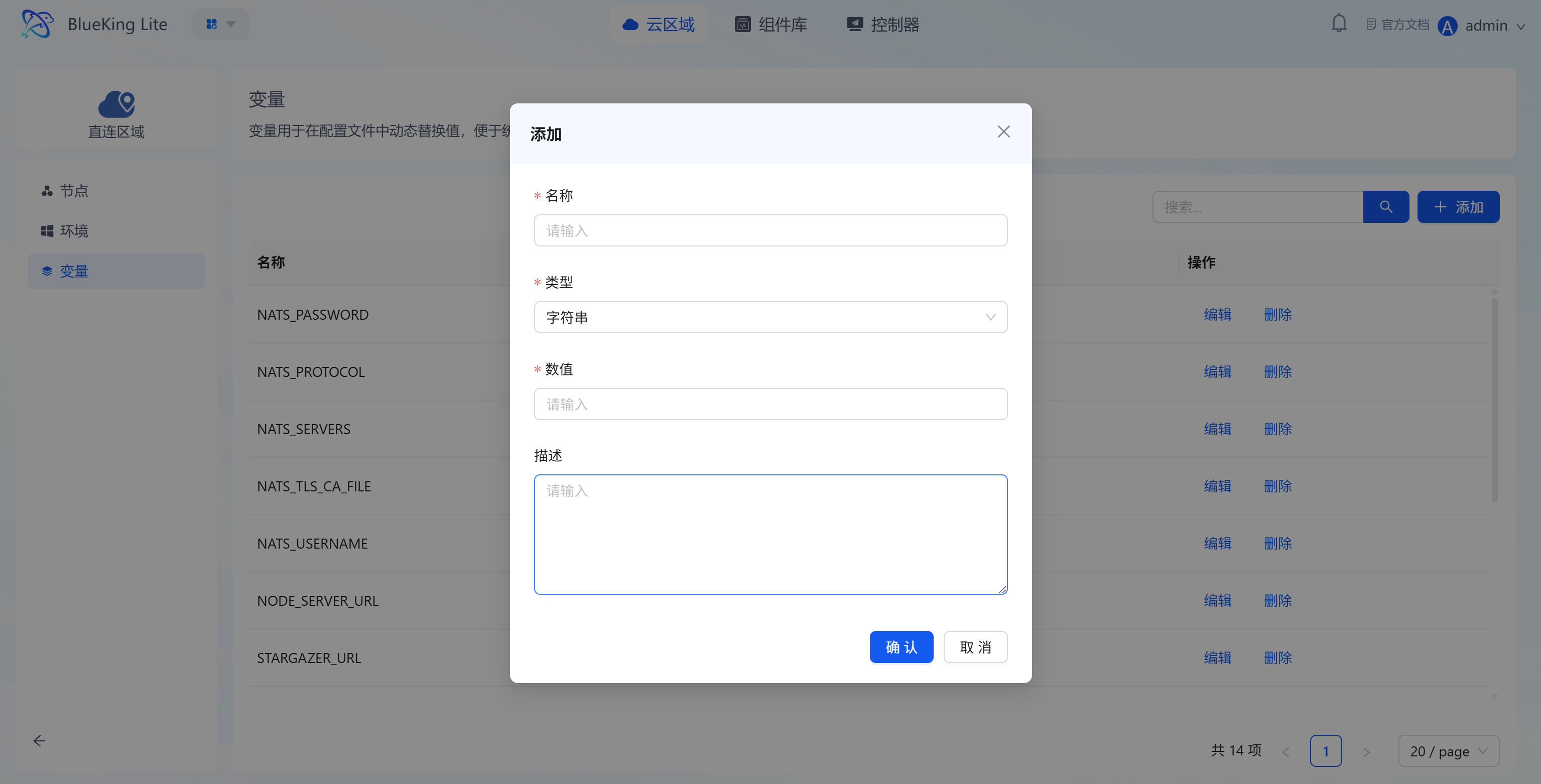
Variables are used for dynamic value replacement in configuration files, enabling configuration reuse and unified control across multiple components, reducing repetitive configuration costs.
Core Features
- Variable lifecycle operations: Supports creating, editing, and deleting variables, with the list displaying variable names, values (sensitive information masked), and operation options;
- Dynamic configuration replacement: Variables can be referenced in component configuration files, enabling unified modification and batch application of configuration values, improving configuration management efficiency.
5. Component Library Management: Centralized Management of Multiple Collection Component Types
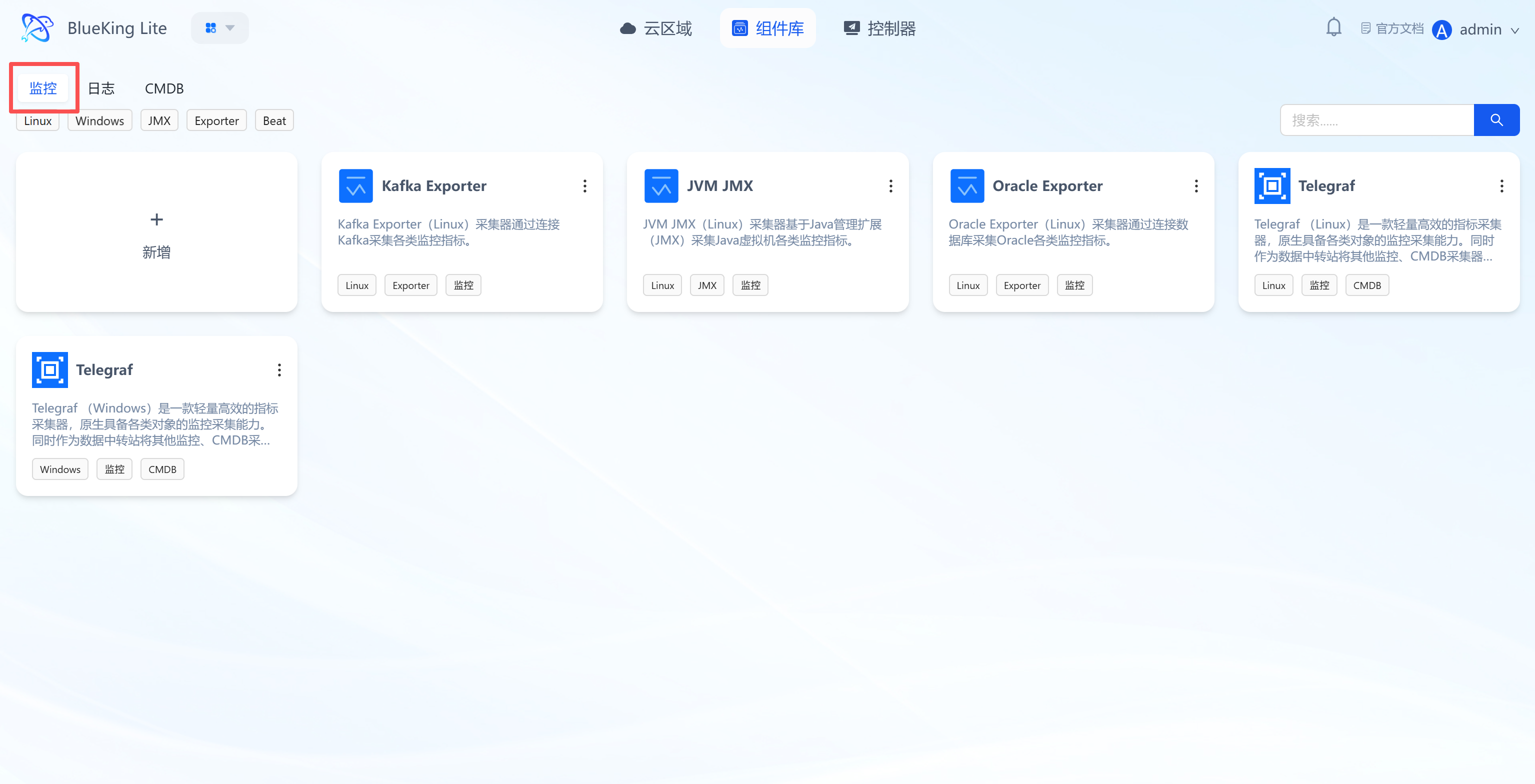
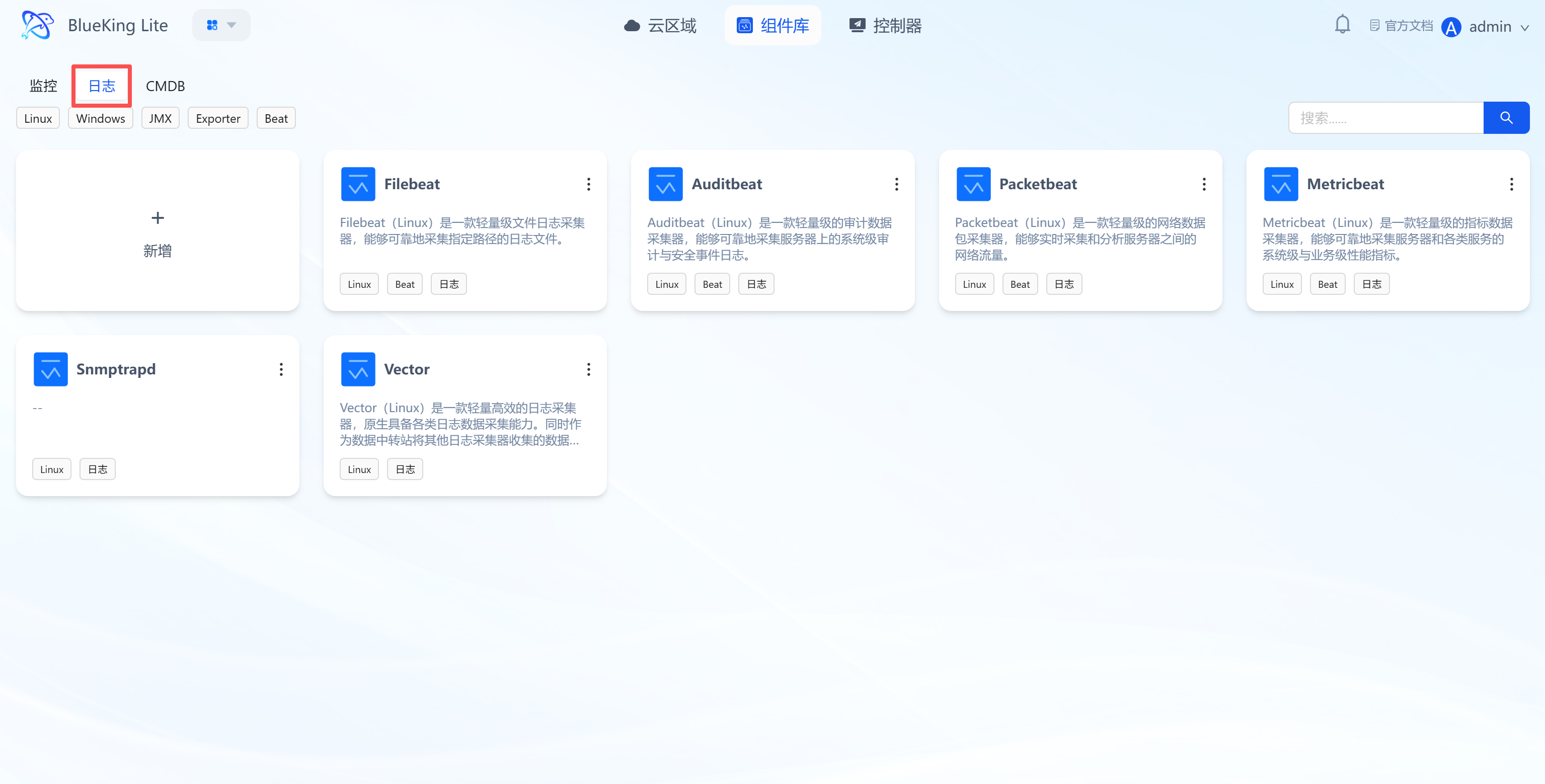
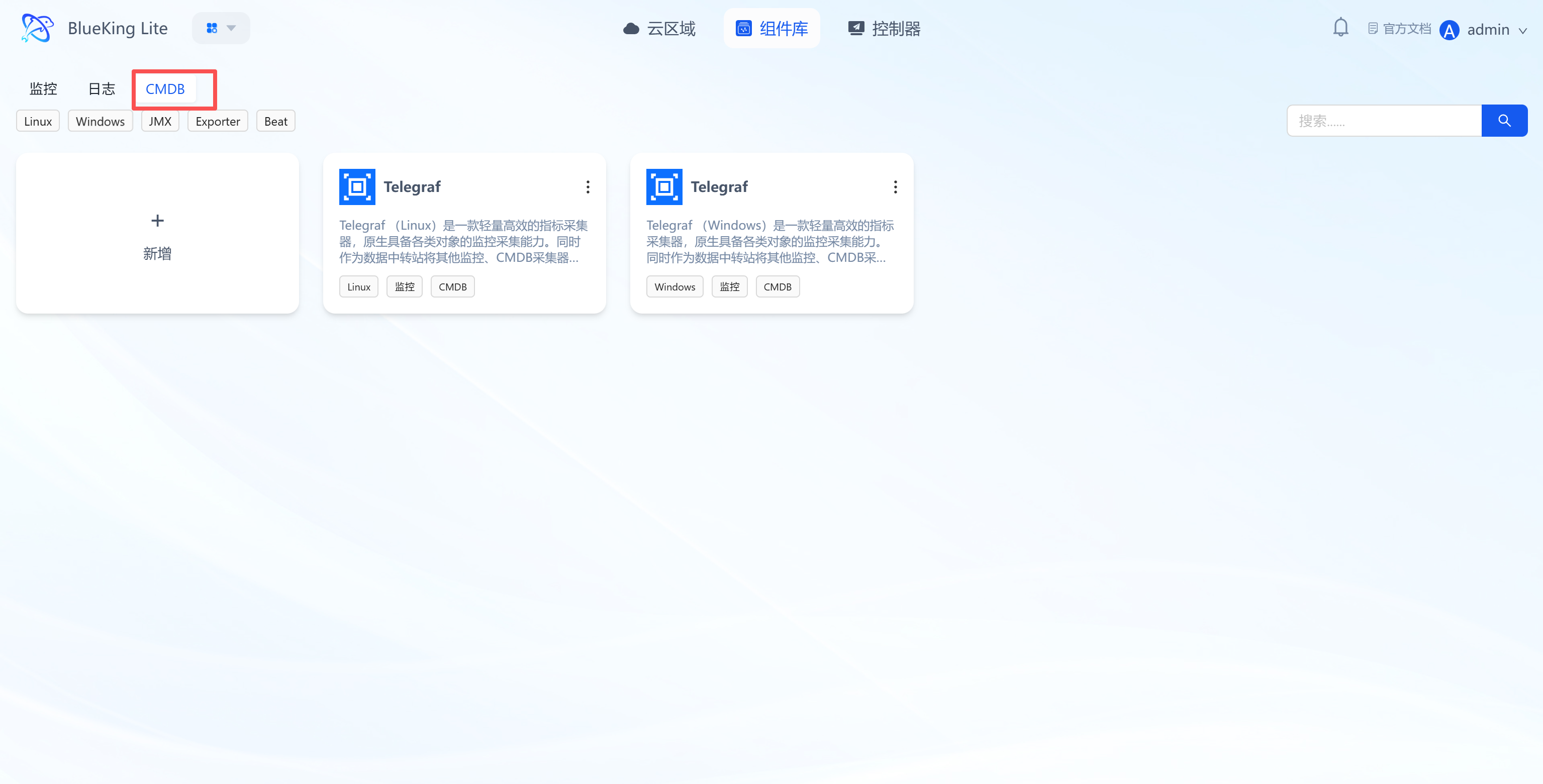
The component library is the resource pool for monitoring, logging, CMDB, and other collection components, supporting component creation, configuration, and version management to cover full-stack collection scenarios. Components are registered uniquely by "operating system + CPU architecture + name", supporting separate maintenance of x86_64 and ARM64 versions for the same collector, with runtime matching by actual node architecture and fallback to generic definitions.
Core Features
- Multi-type component classification management:
- Monitoring: Includes Kafka Exporter, JVM JMX, Telegraf and other performance collection components;
- Logging: Includes Filebeat, Auditbeat and other log collection components;
- CMDB: Includes Telegraf (adapted for CMDB data collection) and other components;
- Built-in network traffic collection capability for Telegraf: The Telegraf collector template has built-in support for NetFlow (UDP 2055) and sFlow (UDP 6343) traffic collection, enabling the collection of traffic data reported by network devices. Collected traffic records are automatically mapped to corresponding asset instances by cloud region and device IP, with instance identifiers and sampling rates annotated, supporting monitoring-side generation of device traffic metrics for coordinated use with the monitoring system's traffic monitoring capabilities.
- Multi-dimensional tag filtering: Supports filtering components by application tag, system tag, and CPU architecture to quickly match the target deployment scenario;
- Architecture-aware collection operations: When executing collector install/start/stop/restart operations on nodes, the system enforces filtering by the selected nodes' CPU architecture to prevent confusion between same-named collectors with different architectures. If the selected nodes' architecture is unknown, the operation is blocked with a prompt;
- Full component lifecycle management:
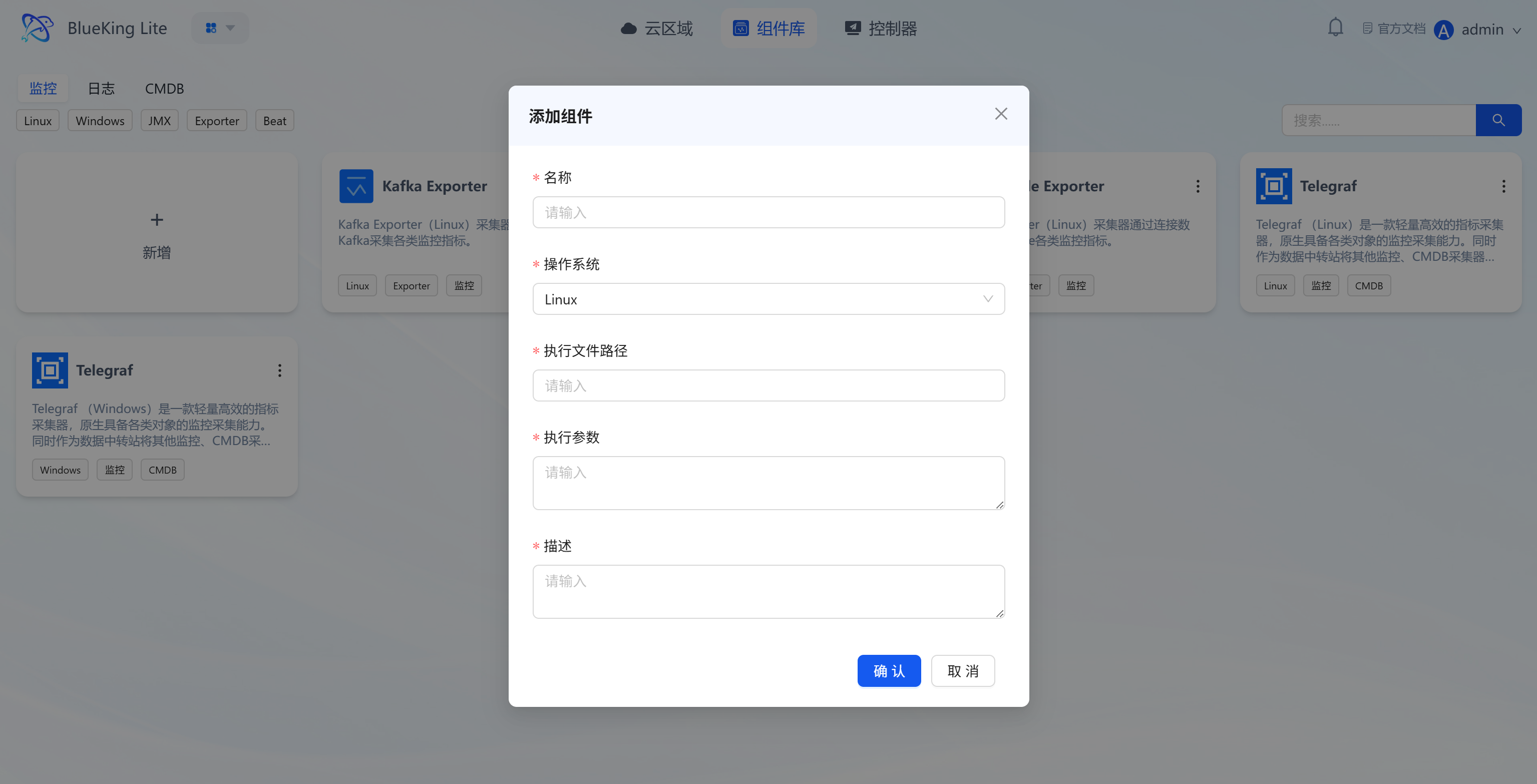
- Create component: Configure component name, compatible operating system (Linux/Windows), CPU architecture, execution path, and other basic information to create the component framework;
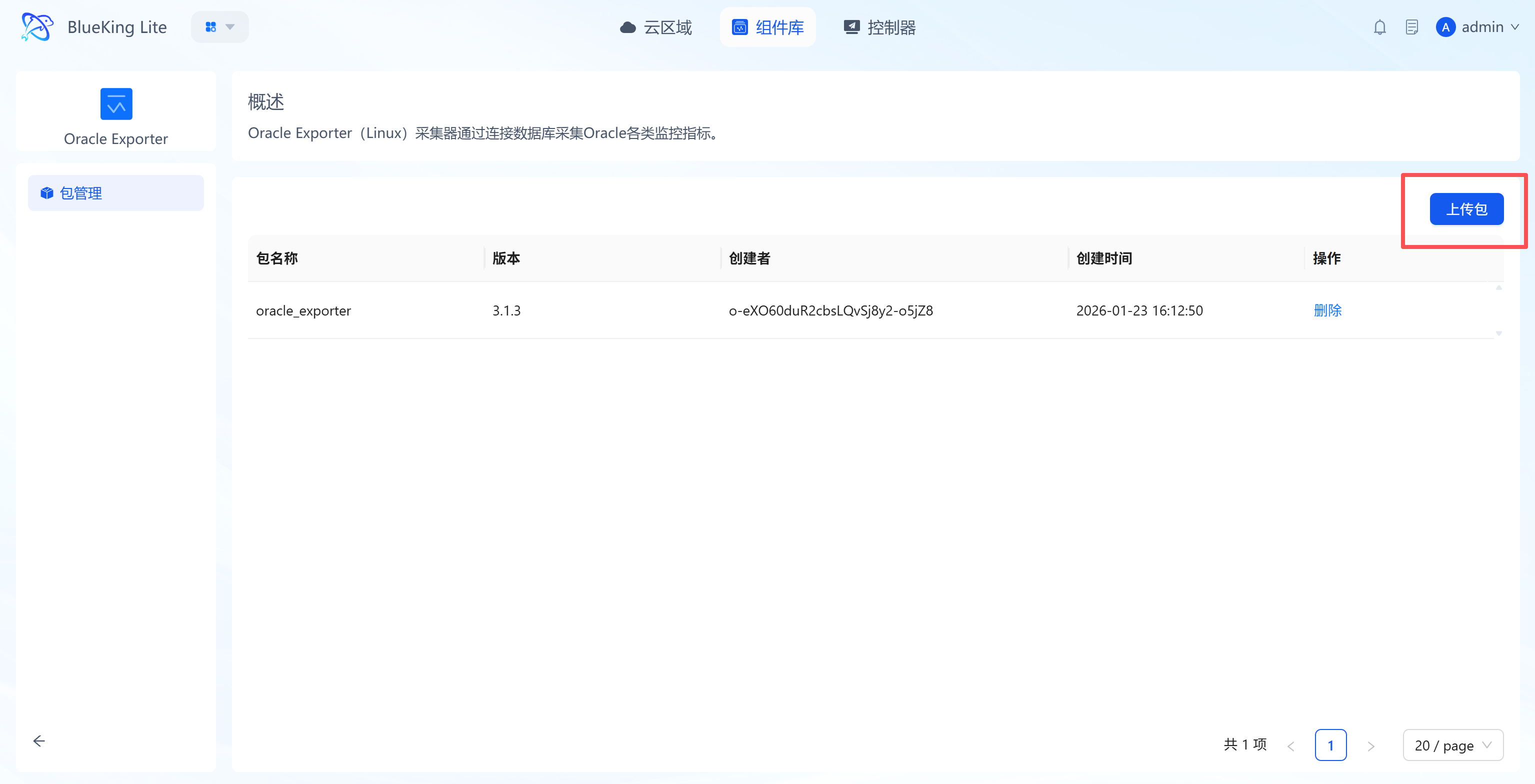
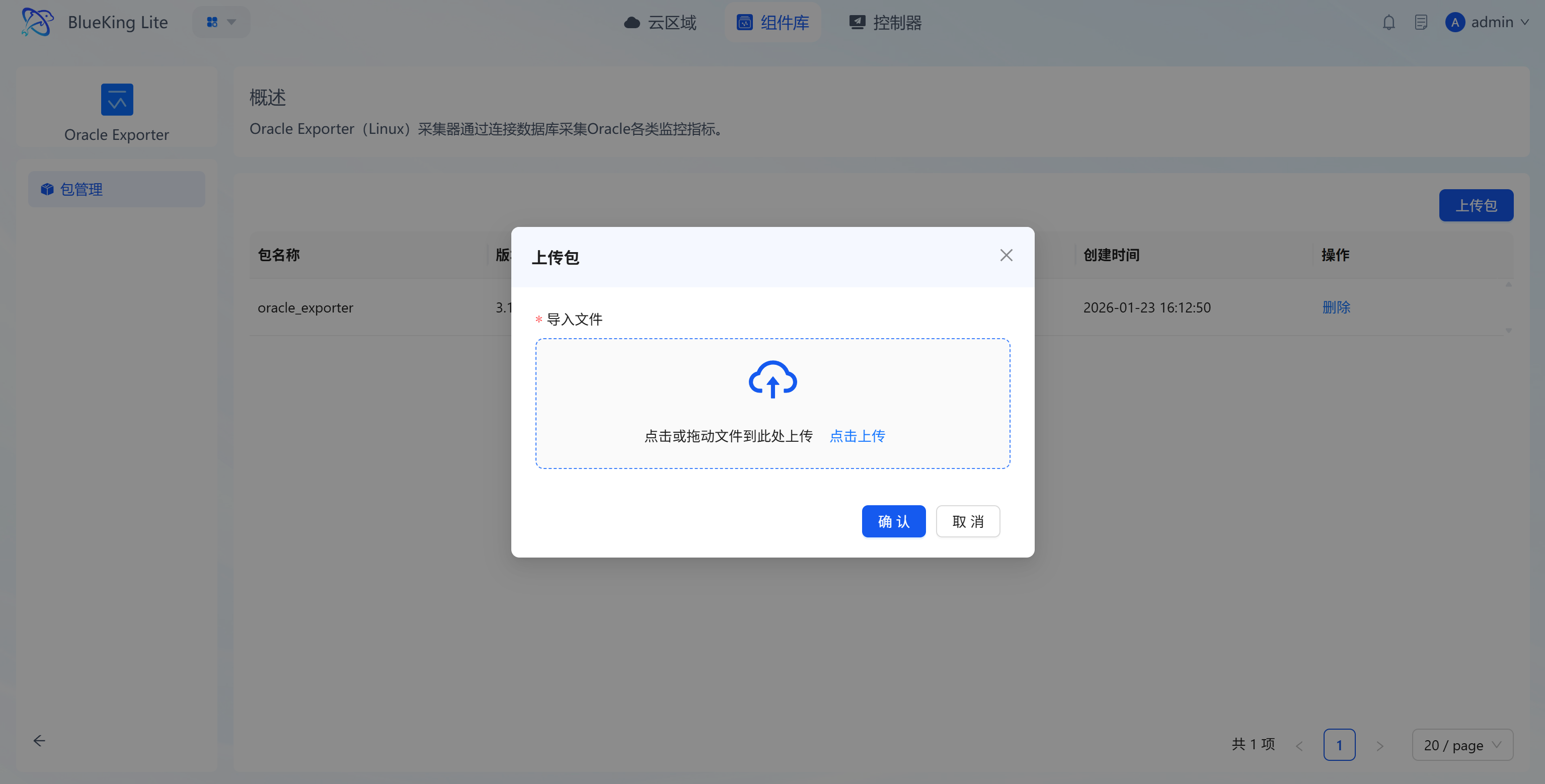
- Upload component package: Click the target component to enter its "Package Management" page, click the "Upload Package" button, and import the component package via "Click to Upload" or "Drag and Drop" in the upload dialog, then confirm to complete the upload.
- Version management: Uploaded component packages are automatically included in the version management system, supporting retention, switching, and maintenance by operating system, CPU architecture, object, and version, enabling custom extension and iteration of components;
- Component label indicators: Each component is tagged with its compatible system, CPU architecture, and component type for quick deployment scenario matching.
6. Controller Management: Core Automation Component for Heterogeneous Nodes
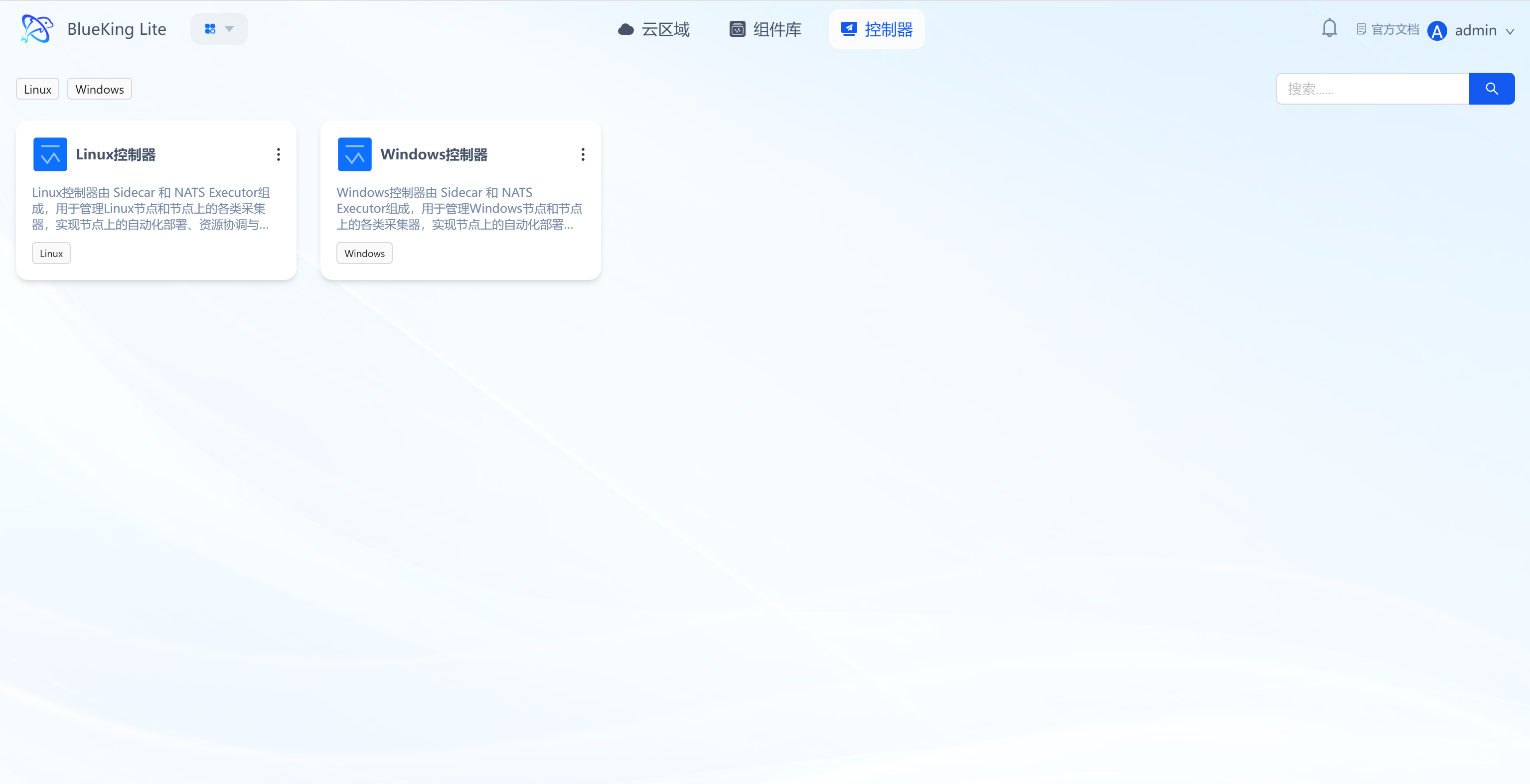
Controllers are the core management units on the node side, responsible for communication between nodes and the platform, as well as lifecycle management of collection components. This module supports dedicated management of three controller types: Linux (x86_64), Linux (ARM64), and Windows (x86_64), adapting to the operations needs of heterogeneous operating systems and CPU architectures.
Core Features
-
Classification display by system and architecture:
- Built-in three controller types: Linux (x86_64) Controller, Linux (ARM64) Controller, Windows (x86_64) Controller, displayed in card format with compatible system and CPU architecture tags, clearly distinguishing controller resources and preventing cross-environment misuse;
- Linux controllers are tagged with architecture labels (
x86_64/ARM64). Windows currently supports x86_64 only.
-
Architecture auto-detection and routing:
- Remote installation first detects target node CPU architecture via
uname -m(Linux) or system commands (Windows), normalizes it, and automatically selects the corresponding installer and controller package. No manual architecture selection required; - curl/bootstrap installation detects architecture locally first, then requests the corresponding architecture's installer and session. One install command adapts to all architectures.
- Remote installation first detects target node CPU architecture via
-
Transparent controller composition and core capabilities:
- All controller types consist of dual components:
SidecarandNATS Executor:Sidecar: Responsible for node-side collection component process management (start/stop/restart);NATS Executor: Responsible for message communication between nodes and the platform, receiving and executing task commands;
- Core capabilities cover: lifecycle management of various collectors on nodes, automated deployment and dynamic coordination of node resources, and command/data transmission between the platform and nodes.
- All controller types consist of dual components:
-
Full controller lifecycle management:
- Create controller: Configure controller name, compatible operating system (Linux/Windows), CPU architecture, deployment path, and other basic information to create the controller framework;
- Upload controller package: Click the target controller to enter its "Package Management" page, click the "Upload Package" button, and import the controller package via "Click to Upload" or "Drag and Drop" in the upload dialog, then confirm to complete the upload.
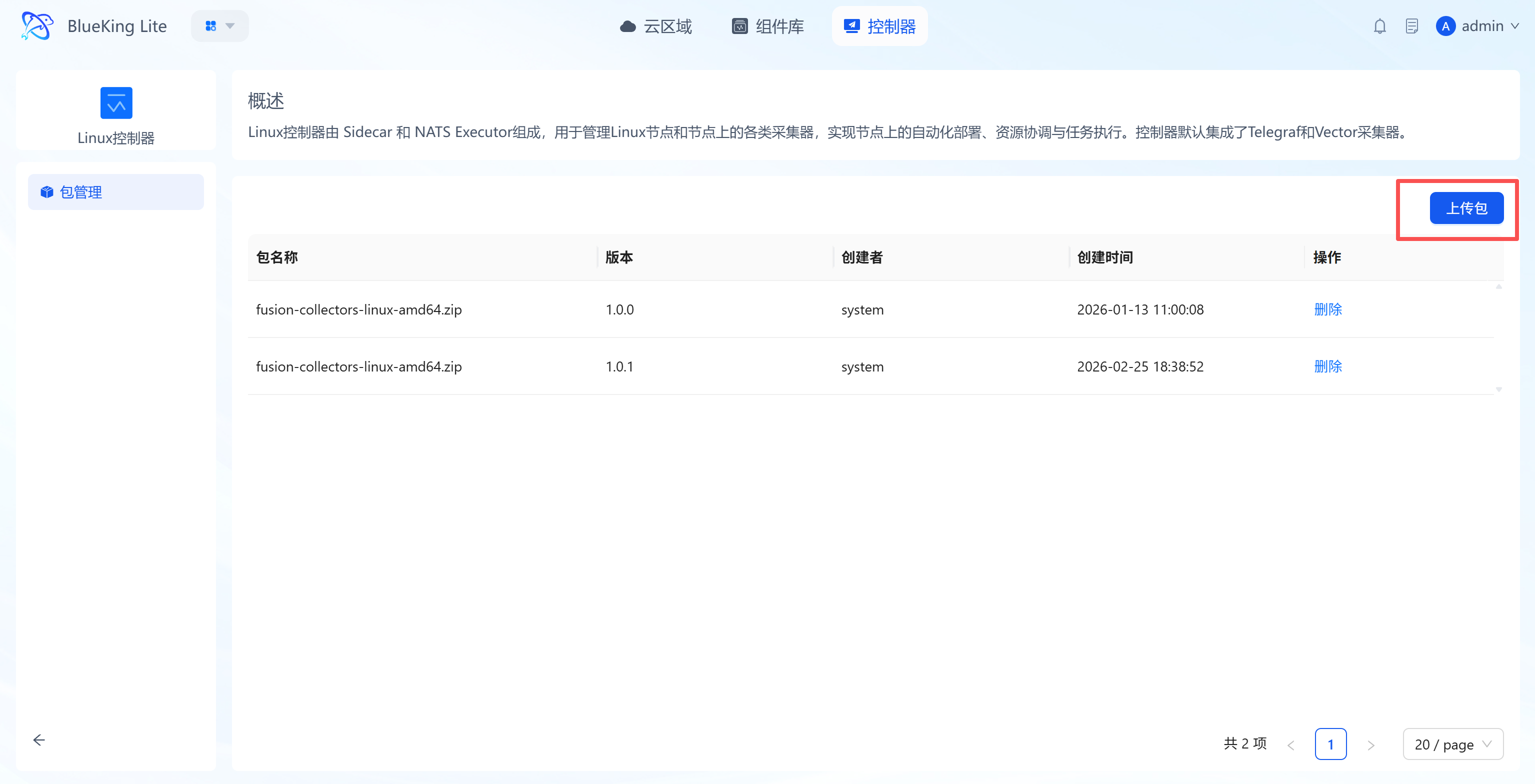
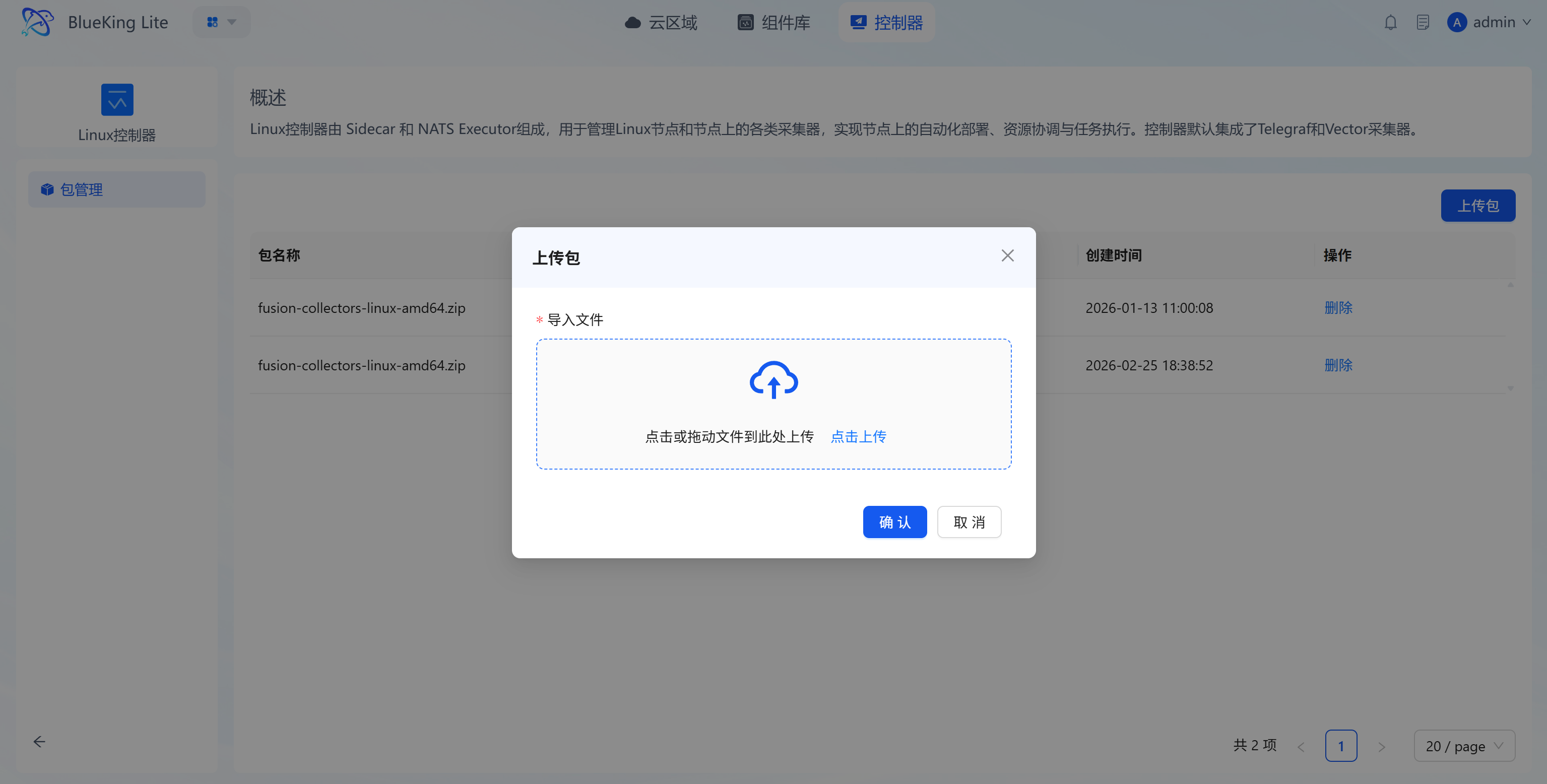
- Version management: Uploaded controller packages are automatically included in the version management system, supporting retention, switching, and maintenance by operating system, CPU architecture, object, and version, enabling custom extension and iteration of controllers;
-
Closed-loop installation and operations: Supports remote installation, manual installation, uninstallation, failure retry, and manual-installation status query, with per-task node-level execution results. Deployment progress is displayed in real-time via a step-by-step status tree, enabling rapid fault localization;
-
Scenario-specific adaptation support:
- Linux x86_64 Controller: Adapted for x86_64 architecture Linux servers and virtual machine environments;
- Linux ARM64 Controller: Adapted for ARM64 architecture Linux servers (domestic servers, cloud-native ARM nodes, etc.);
- Windows Controller: Adapted for Windows server and terminal environments, supporting manual installation with interactive intervention.
-
Legacy node architecture backfill: For nodes with empty
cpu_architecture, administrators can execute management commands to reuse historical SSH credentials for remote architecture detection and batch backfill. Nodes without credentials retain empty values rather than error entries.
7. Collection Configuration Management: Configuration Strategy Definition and Distribution Hub
Collection configuration management is the core capability for implementing batch rule deployment, supporting primary-secondary configuration splitting and node distribution to ensure multi-node collection components execute according to rules and remain controlled.
Core Features
- Primary and sub-configuration separation mechanism:
- Primary configuration: Defines the global base parameters for component operation; a single component has one active primary configuration per node;
- Sub-configuration: Modular definitions for specific tasks (e.g., log collection rules for specific paths, filtering for specific metrics). Sub-configurations follow priority ordering for execution and support flexible creation, modification, and deletion.
- Multi-dimensional configuration binding and batch application:
- Supports establishing flexible binding relationships such as "configuration - multiple nodes" or "node - multiple different component configurations";
- Automatically renders the final configuration format (using node-level variables), distributes the modified configuration files in real time to the corresponding node controllers (Sidecar), completing seamless configuration handoff and updates;
- Node-detail configuration maintenance: Supports viewing hosted-program runtime status, primary configuration, and sub-configuration in the node details, and performing governance operations such as applying, un-applying, and batch-deleting configurations.
8. Installation Package Management: Unified Entry for Version and Architecture Governance
Installation package management is the unified entry for release governance of controllers and collectors, used to maintain installable versions across operating systems and CPU architectures. Controller packages are uniquely identified by "operating system + CPU architecture + object + version", supporting separate maintenance of x86_64 and Linux ARM64 versions.
Core Features
- Package upload and validation: Automatically identifies the version number on upload and validates package file legitimacy against naming rules;
- Multi-dimensional version governance: Supports managing installation packages by type, object, operating system, CPU architecture, and version;
- Download and cleanup: Supports downloading and deleting installation packages, with synchronized cleanup of the corresponding storage files on deletion;
- Duplicate upload interception: Installation packages with the same operating system, CPU architecture, object, and version cannot be uploaded twice;
- Multi-architecture release validation: Release can execute validation commands to verify that installers and controller packages are complete across all architectures, preventing online failures due to missing packages for specific architectures.
9. Security Hardening and Experience Optimization
The latest version, on top of the node operations baseline, significantly strengthens communication security, credential protection, and permission governance, while dramatically improving visibility during anomaly diagnosis.
Core Features
- End-to-end communication encryption (TLS): Full TLS encryption is enabled between nodes (Sidecar/NATS-Executor) and the platform's core services, safeguarding communication data across public networks and hybrid-cloud scenarios.
- Task credential masking and storage: Ansible Executor automatically strips sensitive fields (
password,private_key_content,ansible_password, etc.) before writing to task storage. Credentials never hit disk; thetask_queryinterface no longer exposes plaintext credentials. - Installation session minimum-privilege isolation: Node installation sessions prioritize dedicated download credentials (
NATS_INSTALLER_USERNAME/PASSWORD) over full admin credentials. Without dedicated credentials, the system downgrades and logs warnings, supporting progressive migration. - Node organizational membership incremental sync: Sidecar callbacks synchronize node organizational membership via incremental diff (additions/deletions only), preventing permission drift from full replacements.
- Probe configuration security injection: Sensitive passwords in collection configurations are injected dynamically at runtime via environment variables, rather than hardcoded in plaintext to configuration files, safeguarding credential assets.
- Super-compatible remote deployment: Linux controllers maintain backward compatibility with legacy SSH protocols and "no-sudo" environments. Remote node installation via key credentials is now one-click, adapting to edge and legacy server scenarios.
- Windows manual installation support: Windows controllers fully support manual installation with interactive intervention, adapting to Windows environments where remote connectivity is unavailable.
- Deployment process visualization tracking: Controller installation execution logs are displayed in real-time on the frontend via a step-by-step status tree. Operations staff can pinpoint blocking steps within seconds when environment validation fails, eliminating "black box" deployment.