The Inspection Script Ran Fine for 3 Years, but the Moment Its Author Left, No One Dared Touch It
The Scene: The Day Xiao Zhou Left, the Ops Team Finally Realized How Fragile the Inspection Scripts Were
At 9 AM on Monday, Xiao Zhou submitted the last item in his resignation process.
Scrolling to line 17 of the handover checklist, it reads "owner of the routine inspection scripts." He had six scripts in his hands, spanning three business lines, and the longest-running one had been stable for three years. Every week, the on-duty teammate would say in the group "the scripts ran fine tonight," and nothing had ever gone wrong.
In the handover meeting, Xiao Li, who was taking over, asked one question: "Can I modify this script in the production environment?"
Xiao Zhou thought for a moment and said, "You can, but you have to follow the process I sent out before."
"Where is the process?"
"It's in my head."
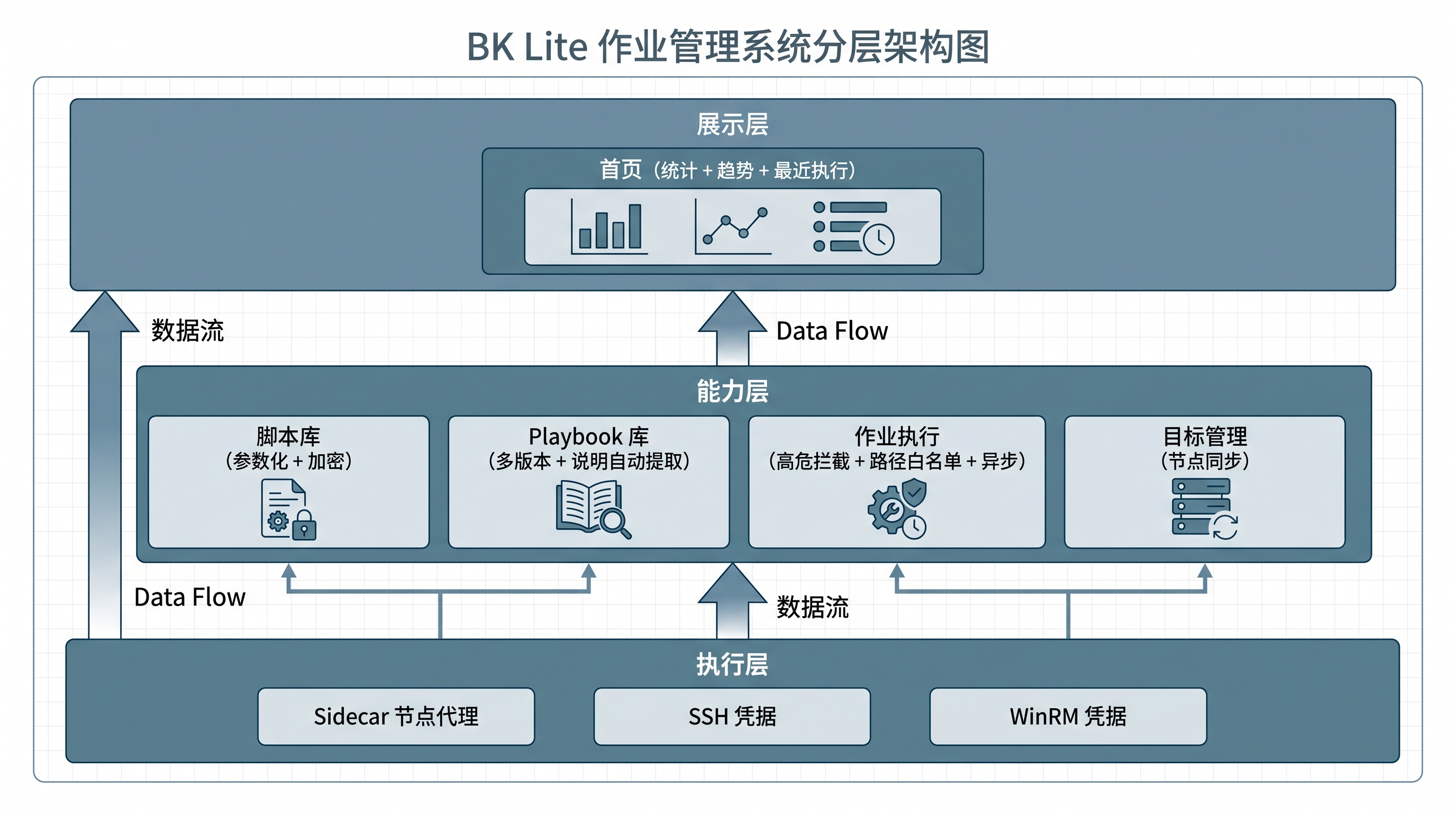
This is not an isolated case. For many teams, the "3-year steady state" of inspection scripts is really just five kinds of information all loaded into the author's head. The script itself is only the tip of the iceberg above the water. Below the water — "the author's experience, run history, version evolution, parameter-naming habits, and dependency relationships" — is what is actually doing the work of keeping things stable.
The moment the author leaves, the whole block below the water leaves with them. The script itself has not moved, but in practice it has already lost the most critical layer of support.
The Root Cause: It Is Not the Script That Is Stable, It Is the Author
Many people's first reaction is "just hire another person who can write scripts." But the real issue here is not "hiring another person." It is that the script's "long-term steady state" has never actually been landed into the product.
Let's look at how these five kinds of information get lost inside the script.
The first kind: the script's key parameters. Target hosts, directories, thresholds, accounts — if these are hard-coded directly into the body of the script, every environment change requires a script change. After enough changes, multiple versions appear across environments, and no one can tell which one is "the latest production version."
The second kind: the author's run-time experience. Under what conditions the script should not run, which commands are high-risk, how many failures count as normal — if this information only stays in the author's head, anyone else taking over can only run it blind until something breaks.
The third kind: the script's historical execution records. Who ran it, how it went, when it ran — if this data is scattered across chat history alone, review time can only stitch it together from memory.
The fourth kind: the script's version evolution. Which bugs were fixed, which environments were upgraded, what is the difference between v1.0 and v1.1 — if the version is not preserved in the product, half a year later when you want to look back at "which version was running during that incident," it is basically impossible.
The fifth kind: the script's dependency relationships. The corresponding Playbook, the uploaded archive, the associated target nodes — if the relationships are not established, the moment the author leaves, the person taking over cannot even figure out "what does this script depend on."
Any one of these five kinds of information being lost can push the script from "long-term steady state" to "high-risk state."
How to Move the Steady State Out of the Author's Head and Into the Product
Using the job management capabilities, we can break this down by how each of the five kinds of information is supported, layer by layer.
1. Scattered Parameters: Separate the Script Body from the Environment Inputs
The most common hidden risk in scripts is to hard-code environment-specific inputs like targets, thresholds, and accounts directly into the file. Every environment change means a script change, and after enough changes, multiple versions naturally appear, until no one can tell which one is "the latest production version."
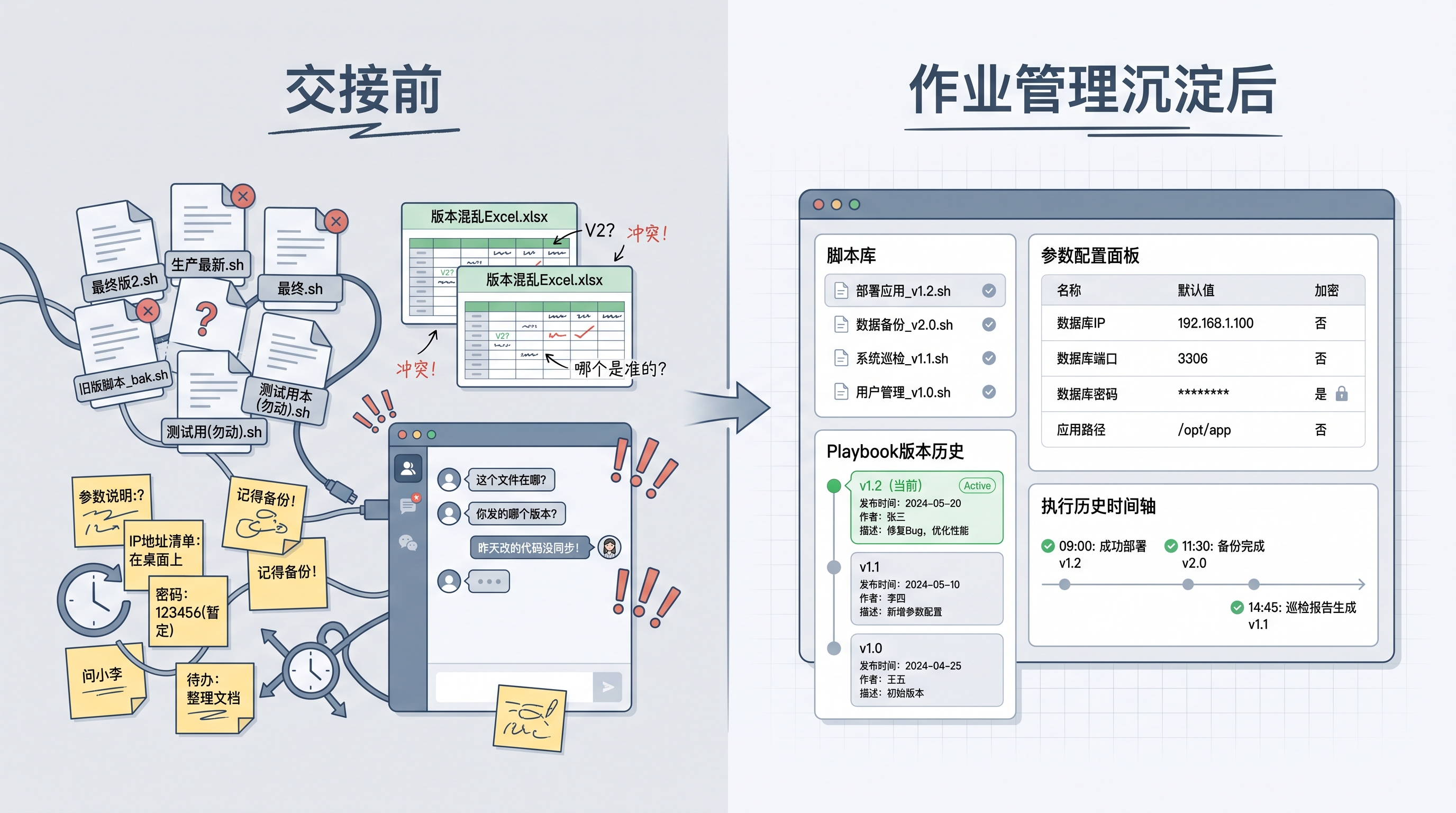
The script library in job management supports parameterization. The script uses template syntax to reference parameters; each parameter is defined separately with a name, label, description, default value, and an encryption flag, and specific values are injected at execution time.
What this capability makes up for is not "writing a few fewer files" — it turns the environment information hidden in code differences into input items that can be viewed and confirmed before execution. When the on-duty teammate takes over, they can directly see "what parameters this script needs, what each parameter means, and whether the sensitive values are encrypted" — instead of guessing "should I change the IP in this comment."
At the same time, built-in scripts are marked as non-deletable, script ownership is isolated by organization, preventing anyone from accidentally deleting critical scripts during the handover period.
2. Run-Time Experience Stays in the Author's Head: Let "High-Risk Judgment" Be Carried by the Product
The real support behind a script running stably for three years is the author's mental model: "under what conditions the script should not run, which commands are high-risk."
On the script side, job management provides script-level default timeouts and encrypted parameters, so that sensitive inputs and risk boundaries are carried by the product together, instead of relying on the author's self-discipline. On the execution side, there is high-risk command detection (regex matching script content; when a forbidden rule is hit, execution is rejected outright) and high-risk path detection (prefix or regex matching target paths, protecting critical system directories).
What this capability does is not replace the author's experience-based judgment. It moves "high-risk judgment" out of the author's head and into the guardrails in front of execution. The author's experience becomes a product rule, not a personal memory.
3. No Evidence During Handover: Turn "Unfamiliar Files" into "Documented Assets"
After the author leaves, the person taking over is often faced with an unfamiliar file: there is logic but no documentation; there are parameters but no description; there is history but no replay.
On the Playbook library side, job management has dedicated support: when a Playbook archive is uploaded, the system automatically extracts the name, version, description content, file list, and parameter definitions; it supports multi-version coexistence (a Playbook with the same name can have v1.0, v1.1, and v1.2 all available at the same time — every time the author makes a change, a new version is created instead of overwriting the old one).
This means that the README and change notes the author used to attach when writing a script have their first chance to enter the product directly, rather than staying on the author's local machine.
On the execution side, job management records and displays the Playbook version used by an execution, and supports previewing that Playbook's file content within the record. Half a year later, when reviewing a past incident, you can see "the version at that time," not "the latest version."
4. Version Evolution Is Invisible: Make Reviews Not Rely on Memory
Many teams get stuck on one thing during incident review: "Which version was actually running in that execution?"
Job management supports re-running based on historical records, with queries by job type, status, and time range. For Playbook-sourced execution records, the Playbook version used at execution time is recorded and displayed as an immutable snapshot of the execution record.

During review, you can pull up directly "the execution record from that day + the Playbook version used at that time + the target nodes at that time + the execution result at that time," instead of "I think that's how it ran."
Technical Insight: The "Long-Term Asset" of an Inspection Script Is Made of Four Kinds of Verifiable Information
Pulling the four layers above back together, for an inspection script to truly become a long-term asset, four kinds of verifiable information need to exist at the same time:
- Parameterizable: Are the key inputs extracted out of the script body and turned into structured parameters (name / description / default value / encryption)?
- Guardrailed: Are high-risk commands and high-risk paths blocked by product-level rules, instead of relying only on the author's self-discipline?
- Documented: Are descriptions, file lists, and parameter definitions automatically extracted when the Playbook is uploaded, instead of staying on the author's local machine?
- Replayable: Do execution records carry version snapshots, can they be queried by time range, and can they be re-run based on history?
When all four kinds of information are in place, the script moves from being "an extension of personal memory" to being "an operations asset that can be passed on."
Tying the Layers Back Together: What an Ideal Handover Should Look Like
Going back to the scene at the beginning, if Xiao Zhou's team had already done a round of consolidation with job management, what would the day Xiao Zhou leaves look like?
- Xiao Li opens the script library and sees the structured parameter list of the six scripts. Every parameter has a description and a default value, and the sensitive values are already encrypted.
- Scrolling to Playbook v1.2 (the latest), he sees the documentation automatically extracted when the author uploaded it, and knows what v1.1 fixed and what v1.2 changed.
- Pulling up the execution records, he sees 3 years of execution history, each entry carrying a Playbook version snapshot, so during review he can directly pull up "the version from that time."
- Critical scripts are marked as built-in and non-deletable, so they cannot be accidentally removed.
- High-risk commands and paths are blocked by product-level guardrails before execution, no longer relying on Xiao Zhou's mental judgment.
This handover does not need "the stuff in Xiao Zhou's head." It is already in the product.
A Few Questions to Ask Before Getting Started
If your team's inspection scripts depend on someone's memory, you can start with a quick self-check using the following questions:
- Have the key parameters been extracted out of the script body?
- If they are still scattered through the code, prioritize parameterization.
- Are high-risk commands and high-risk paths blocked by product rules?
- If they only exist in the author's head, prioritize putting the rules into the system configuration in job management.
- Is the description automatically extracted when a Playbook is uploaded?
- If not, prioritize turning it into a Playbook instead of continuing to maintain it locally.
- Do execution records carry version snapshots?
- If not, half a year later, when you want to do a "that incident" review, there will basically be nothing to look up.
You do not have to change everything at once. You can start with the high-frequency, often-tweaked critical scripts, and gradually move the author's "parameter naming habits, risk judgments, and version evolution" out of their head and into the product, so the rest of the team can take over the maintenance.
The reason an inspection script can run stably for three years is the person behind it. The reason it can keep running stably in the fourth year is that the product has taken over the context the author used to carry in their head.