How MLPS Compliance Uses Password Policy to Guard Identity Access
Twenty minutes before the morning meeting, operations lead Xiao Li is asked a very ordinary question: who logged into the platform and changed last night's configuration?
He opens the audit records and sees a long-shared operations account. The login source can be found, and the operation time can be found, but nobody can immediately conclude which colleague, outsourcing engineer, or temporary helper was behind that account.
Worse, the password for this account has not been changed for a long time. Several people know it, and browsers may have saved it as well. Before the review meeting even begins, the question has already shifted from "who changed the configuration incorrectly" to "can this identity entrance still be trusted?"
Password policy is not there to make the login page look safer. It is there so accounts, passwords, sessions, and audits can connect into a traceable governance chain.

The Root Cause
When many systems go through security remediation, password policy is often split into a few isolated settings: password length, complexity categories, rotation period, failed-login lockout, and session timeout.
All of these settings matter. But if the team only looks at configuration items, it can easily miss the deeper question: has the identity entrance formed a closed loop?
A loose identity entrance usually has several breakpoints at once:
- An account can log in, but it may not map to a specific responsible person
- A password is easy to remember, and therefore easy to guess or reuse
- Login failures have no cost, so attackers can keep trying
- Sessions remain valid for too long, and access stays behind after people leave
- Logs exist after the fact, but they cannot connect account risk with later operations
Compliance focuses on password policy because these are the breakpoints it wants to constrain.
One: Unique Accounts
The first thing that blocks Xiao Li is not password complexity, but account identity.
Shared accounts are common in operations work. Public administrator accounts make collaboration convenient, temporary test accounts make troubleshooting convenient, and outsourcing accounts make short-term delivery convenient. Their problems do not show up every day, but once an audit begins, they immediately expand.
Who logged in? Who executed the operation? Who made the change?
If the log only shows one public account, permission division, responsibility confirmation, and review remediation all become vague. The audit does not lack data; the data simply cannot point to a clear person.
BK Lite System Management uses users, organizations, roles, and data permissions as a unified governance foundation. Within the same domain, usernames are unique. This capability solves the first layer of the identity entrance: accounts, organization ownership, and later permission relationships become maintainable objects.
Two: Password Quality
After accounts can map to people, the second question is whether the password itself can withstand guessing and reuse.
The risk of weak passwords is not that they look unprofessional. It is that the attack cost is too low. Company abbreviations plus years, the last digits of phone numbers, and common administrator passwords can all be covered by dictionary attacks. Credential stuffing is even more common: one peripheral system leaks a set of usernames and passwords, and attackers try them against core systems.
Complexity increases the cost of guessing. Expiration shortens the usable time after leakage. The two cannot replace each other.
Complex passwords that never rotate cannot stop already leaked credentials from staying valid. Regular rotation that still allows simple passwords can easily become a cycle of weak passwords.
BK Lite password policy supports configuration for complexity, length, validity period, failed-login lockout, and reminder period. The default length range is 8 to 20 characters, requiring uppercase letters, lowercase letters, numbers, and special characters. The default validity period is 180 days, with reminders 7 days before expiration. After password change, the system updates the password change time and resets error counts and lockout status.
Three: Failed-Login Lockout
As the review continues, Xiao Li needs to confirm another detail: were there abnormal failed logins last night?
If the login entrance allows unlimited retries, attackers do not need to succeed immediately. They can try slowly, in a distributed way, over a long period, hiding brute force attempts inside normal access noise. Failed-attempt limits and lockout duration turn unlimited guessing into a limited window.
BK Lite supports configuring failed retry count and lockout duration. Login failures are accumulated by attempt count. After the threshold is exceeded, the account is locked until the lockout expires or the password is changed. The default policy locks the account after 3 failed attempts for 180 minutes.
Lockout is not universal protection. It cannot replace password changes after credential leakage, nor can it replace abnormal login investigation. But it significantly raises the cost of continuous guessing and prevents attackers from treating the login entrance as a cost-free guessing interface.
Four: Session Boundary
After accounts and passwords are handled, one commonly overlooked question remains: what happens after login succeeds?
Operations backends, configuration platforms, and audit entrances usually have high privileges. If a person leaves but the session remains in the browser, someone else taking over the computer, an unclosed remote desktop, or a reused browser can all turn a legitimate login into later impersonation.
Login validity and timeout exit handle this blank space.
BK Lite login settings support OTP switches and login validity configuration. Login validity constrains the session lifecycle, while OTP adds a second valid credential for high-risk entrances. Passwords may be guessed, phished, or reused. The value of OTP is reducing the risk of "having the password means getting in."
Five: Identity Sources
At the organization level, password policy faces a more realistic challenge: scattered accounts.
When accounts are distributed across different systems, offboarding, organization changes, and permission recovery all slow down. Each system maintaining its own password policy also makes security requirements unstable in execution.
BK Lite supports the BK-Lite default authentication source and WeCom authentication source. It supports adding, editing, deleting, enabling, and disabling authentication sources, as well as user and organization synchronization. Authentication source management is not about having more login methods. It is about bringing identity source, organization ownership, and later permission governance back into one chain.
Technical Insight
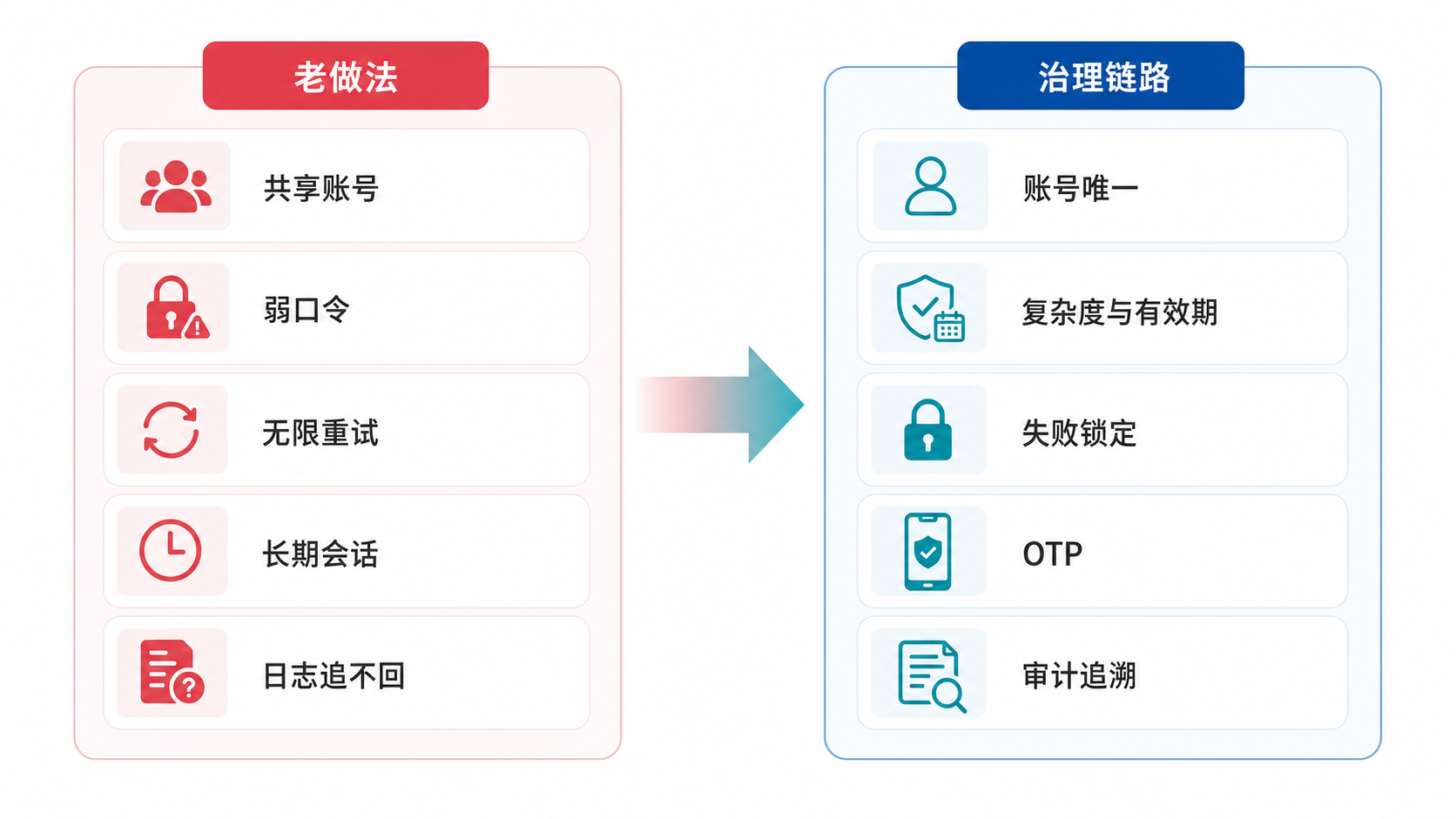
For password policy to truly work, it must answer at least four questions:
- Identifiable: can the account map to a clear identity instead of a public account?
- Restrictable: are weak passwords, long-lived passwords, and unlimited retries constrained by system policy?
- Strengthened: do high-risk entrances use OTP or authentication source governance to compensate for the limits of static passwords?
- Traceable: can failed logins, successful logins, and later operations form an audit evidence chain?
If any one layer is missing, the identity entrance leaves a gap.
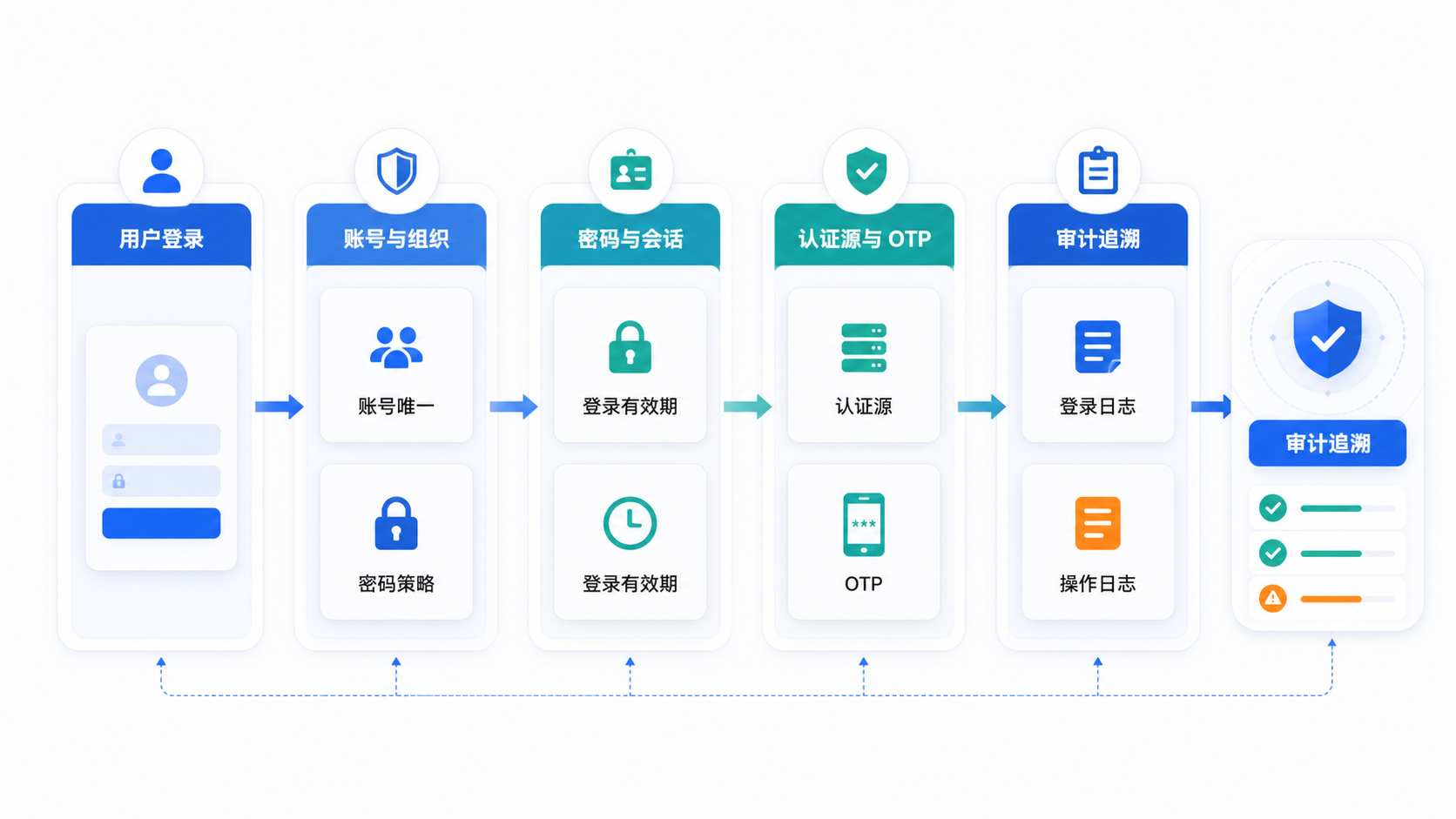
BK Lite's Entry Point
BK Lite does not make password policy an isolated page. It places it inside the identity governance capabilities of System Management.
At the user and organization layer, the platform maintains users, organizations, roles, and data permissions. Usernames are unique within the same domain, so accounts first become governable objects.
At the security policy layer, the platform supports password complexity, length, validity period, failed-login lockout, reminder period, OTP, and login validity configuration, so passwords and sessions do not depend only on manual policy.
At the authentication source layer, the platform supports the BK-Lite default authentication source and WeCom authentication source, as well as authentication source enablement and user or organization synchronization, making identity sources easier to maintain consistently.
At the audit layer, the platform provides login logs and operation logs. Login logs record success or failure, username, source IP, operating system, browser, location, and failure reason. Operation logs record cross-application create, update, delete, and execution operations, support filtering by module, type, and time range, and support export.
Together, these capabilities pull Xiao Li's "who logged in?" problem away from after-the-fact debate and back into system governance.
Self-Check List
If you want to check whether a system's password policy is truly close to compliance-oriented governance, start with these questions:
| Checkpoint | Do Not Only Check |
|---|---|
| Are accounts unique? | Whether usernames exist |
| Does the password have complexity requirements? | Whether password setting is allowed |
| Does the password have an expiration period? | Whether policy documents remind users to change it |
| Are failures locked out? | Whether failures are logged without retry limits |
| Do sessions expire? | Whether login success grants long-term validity |
| Is enhanced authentication supported? | Whether all entrances rely only on static passwords |
| Is authentication source management available? | Whether each system maintains identity separately |
| Are audit logs available? | Whether only login can be checked, without linking later operations |
Conclusion
Compliance cares about password policy not because password settings are easiest to inspect, but because the identity entrance is the easiest place to break through at low cost.
Weak passwords, shared accounts, long-lived passwords, unlimited retries, leftover sessions, and untraceable logs look like different problems, but they all lead to the same result: the system knows someone entered, yet cannot say whether the identity was trustworthy or how later actions should be traced.
Doing password policy well protects the first gate of identity governance.