How Should Operations Platform Permissions Be Adjusted After a Role Transfer?
On Xiao Zhou's first day after transferring from the payment assurance group to the member platform group, his account is quickly added to the new organization, and he can view the new team's assets and alerts normally.
But when he opens the asset list, servers from the original payment team are still there. When he enters Alert Center, alerts currently being handled by the old team can still be opened as usual.
From a work handover perspective, Xiao Zhou has already left his old role. From the system's perspective, however, he still has access to both teams. The transfer process is complete, but the permission boundary has not changed with it.
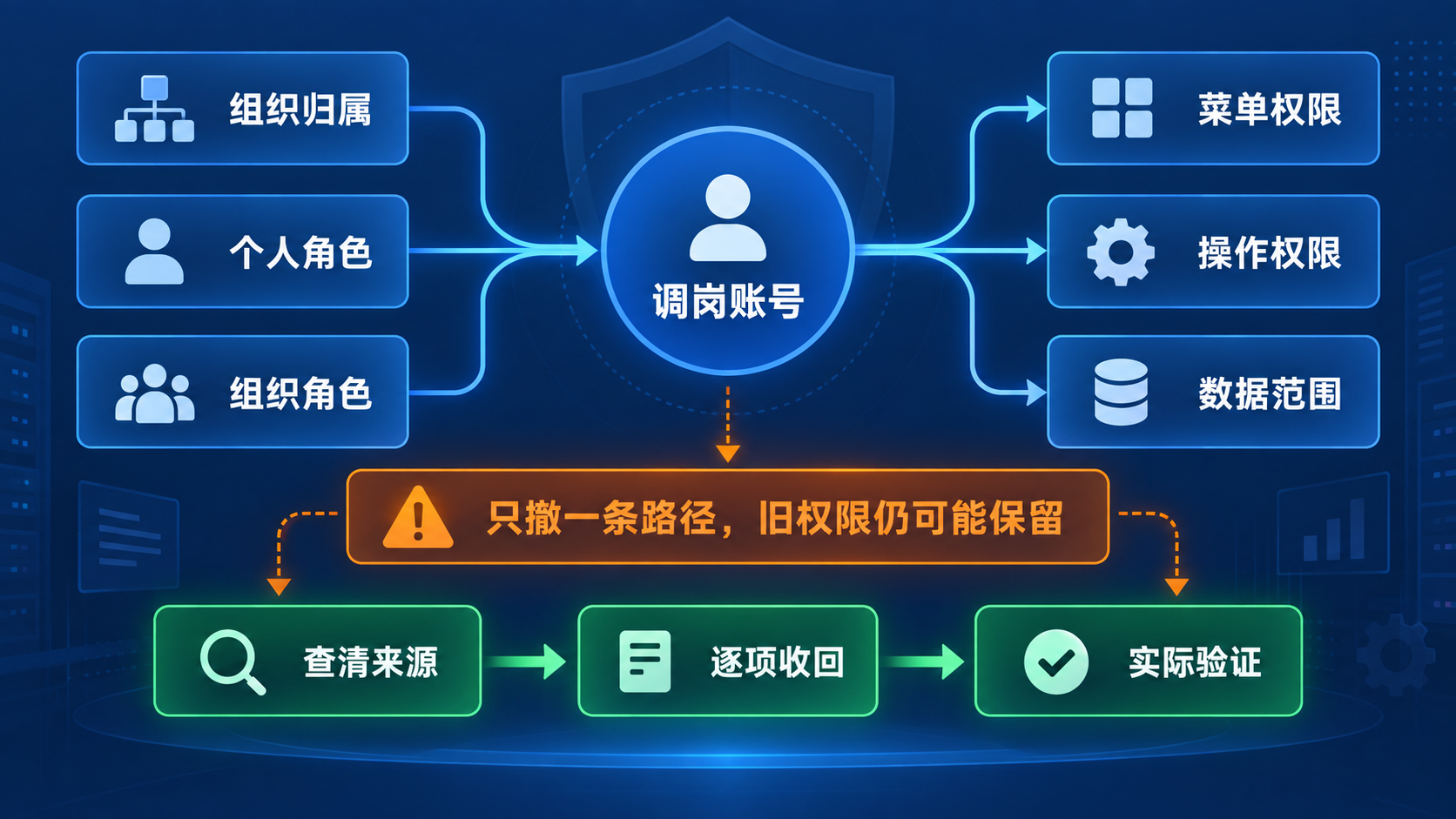
This is not a minor problem of "a few extra rows appearing in a list." Asset names, business ownership, alert details, and incident context are internal information that need access control. Even if the user performs no operation, access alone means the responsibility boundary has already been crossed. If the old role also includes editing, execution, or alert-handling capabilities, the risk expands from information visibility to mistaken operations and responsibility confusion.
People Relationships Change, Authorization Relationships Do Not Disappear Automatically
When a company handles a role transfer, it usually solves the urgent problem first: can the employee start working in the new role quickly?
Administrators add the user to the new organization, grant new roles, and enable new-team data. New permissions are explicit requirements; if any are missing, the user will immediately report it. In contrast, old permissions often do not affect login or current work, so they are easily ignored.
As a result, many transfers only complete the "add" step, not the "remove" step.
More importantly, organization relationships, application roles, and data rules inside the platform are not the same as job relationships in HR systems. A change in reporting line does not naturally trigger every system to revoke old permissions. The platform also cannot decide for the company which capabilities the new role needs, or whether the old role should keep temporary handover access.
To solve this, do not jump directly from "which team should this account belong to" to "delete one role." First answer this question: where does each effective permission come from?
One Access Capability May Come From Multiple Paths
Effective permissions in an operations platform are usually not decided by one point. They are the result of multiple sources being layered together.
Organization Relationship
The user may still be bound to the old organization, or may be covered by the authorization scope of a parent organization. On the surface, the person has joined the new team. But during permission calculation, the old organization path may still hold.
Application Role
A role may be granted directly to an individual, or inherited through an organization role. After removing an individual role, access will not disappear if the organization role still exists. The reverse is also true.
Data Rules
Menus, operations, and data are three different layers. Menu permissions decide whether page entries are displayed. Operation permissions decide whether the user can create, edit, execute, or handle items. Data permissions decide which organizations' data can be seen and operated on after entering a page.
Hiding a menu does not mean the old team's data scope has been tightened. Canceling one operation does not mean asset and alert content is no longer visible.
External Identity Synchronization
If organizations and roles are synchronized from an external identity source, synchronization rules must also be checked. A relationship manually removed by an administrator inside the platform today may be written back during the next synchronization. In that case, the problem is not that the platform change failed, but that the real authorization source still lives in an external system.

This is why permission troubleshooting often repeats. The administrator sees one path and revokes one path, but does not reconstruct the full authorization chain. As long as one remaining path can reach old-team data, the user still has access.
Revoking Transfer Permissions Is Not Deleting the Account
After old permissions are found, disabling or deleting the account may look like the most direct approach. But a role transfer is different from departure. The user still needs to use the platform in the new role, and that approach would also cut off necessary permissions.
Another common action is to directly change the old role. If that role is shared by multiple people, changing its permissions will affect other normal members.
A more stable approach is to first confirm Xiao Zhou's responsibilities in the member platform group, keep the access capabilities that the new role truly needs, and then revoke old-job authorization paths one by one: remove the old organization binding, remove him from old role members, and adjust the old team's data scope. If authorization comes from external synchronization, fix the source rule there.
The goal of revocation is not to make the account have "as few permissions as possible." It is to make effective permissions accurately match current responsibilities.
Check Layer by Layer Along Authorization Sources in BK Lite
When facing the issue of "old assets and alerts still visible after a transfer," first check the user details in BK Lite System Management. Confirm the organizations currently bound to the user and the roles the user owns, then continue along role members, application permissions, and data permissions.
A more stable check order is:
- Confirm account status and exclude account abnormalities or use of the wrong identity.
- Check the user's organization binding and any parent organizations that may cover the user.
- Verify application roles directly granted to the person and roles obtained through organizations.
- Check menu permissions and operation permissions separately.
- Check data scopes configured by organization and application.
- If an external identity source is connected, confirm that synchronization rules will not write old relationships back.
For roles themselves, check member relationships to determine whether the old role was granted to Xiao Zhou personally or to an organization he still belongs to. For data access, further check which organizations and applications the rules match, so the team does not fall into a situation where "the menu is revoked, but the data scope remains."
After organization unbinding, role-member removal, or data-rule adjustment, refresh permissions so the new configuration takes effect in time. If necessary, ask the user to log out and log back in, instead of judging with an old session.
Configuration Changes Are Not the End; Real Access Results Are
The backend showing that an organization has been unbound and a role has been removed only proves that management actions were executed. It does not by itself prove that old access has disappeared.
Before revocation, prepare clear positive and negative test objects. For example, choose a known asset and alert from the original payment team as negative cases, and choose assets and alerts from the member platform group as positive cases.
After refreshing permissions, have the user log in with the actual account and verify:
- Old-team assets cannot be viewed.
- Old-team alerts cannot be opened.
- New-team assets and alerts remain accessible.
- Operations allowed for the new role can be completed.
- Create, edit, execute, and handle entries no longer needed by the old role have disappeared.
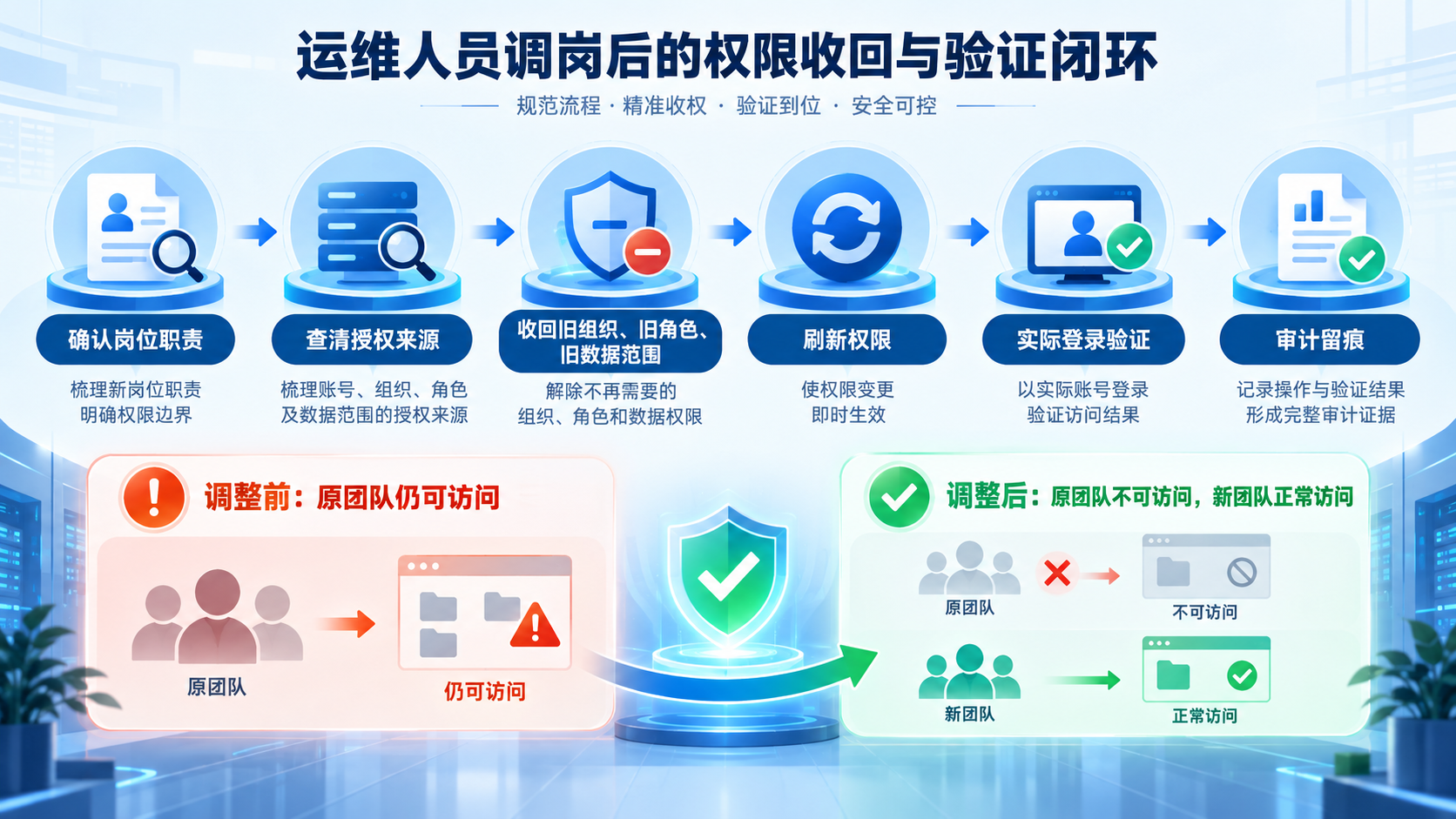
If old data remains visible, do not repeatedly modify the same role. Return to the authorization chain and keep looking for other sources. A second application role, parent organization coverage, omitted data rules, and external synchronization writeback are all directions to check first.
Login logs and operation logs can help confirm account activity, configuration changes, and operation clues, but they cannot replace access testing. The absence of operation records does not prove the user has not browsed information. Likewise, a configuration page showing deletion success cannot replace the user's real access verification.
Turn Transfer Permission Governance Into a Closed Loop
Troubleshooting only after a problem appears is easy to miss details, and it is hard to keep each handling process consistent. A better long-term approach is to solidify transfer permission governance into seven steps:
- Confirm job responsibilities: clarify the systems, operations, and data scopes that must remain for the new role.
- Inventory current permissions: summarize the account's organizations, roles, menus, operations, and data permissions.
- Identify authorization sources: distinguish personal grants, organization inheritance, data rules, and external synchronization.
- Precisely revoke old permissions: remove old organizations, old roles, and old data scopes without affecting the new role.
- Refresh permissions: ensure organization, role, and rule adjustments take effect in time.
- Verify with real login: use old-team and new-team test objects to verify negative and positive results.
- Keep process records: record adjustment content, operator, time, and verification conclusion for later review.
BK Lite provides organization, user, role, application permission, data rule, permission refresh, login log, and operation log management capabilities to help administrators reconstruct and adjust authorization chains. But the platform does not automatically understand HR role changes, nor does it decide for the company what permissions an employee needs in the new role. Whether handover permissions should be retained, how long they should remain, and who should confirm them still require organizational policy and business owner decisions.
The real sign that transfer permission governance is complete is not that a new role has been added, nor that one backend deletion has been executed. It is that old-team assets and alerts are no longer accessible while the new team's necessary capabilities still work normally.
Only when personnel changes, authorization sources, precise revocation, and real verification form a closed loop can permission boundaries truly keep up with organizational change.