How Can Operations Notice Scheduled Task Failures in Time?
Twenty minutes before the morning meeting, operations lead Xiao Yang receives a message from a business contact: yesterday's daily report was not updated.
He checks monitoring first. The overnight daily sync did not show a rise in errors, host CPU had no spike, and the alert list had no new record. Only after opening the task execution records does the problem appear: this sync, which should have completed overnight, did not leave the "sync completed" event.
The easiest wrong assumption in this scene is: if there is no alert, the task is probably just late.
But the report is still stuck at yesterday. For the business, whether the task threw an exception is not the final answer. Whether it delivered the expected result at the agreed time is.
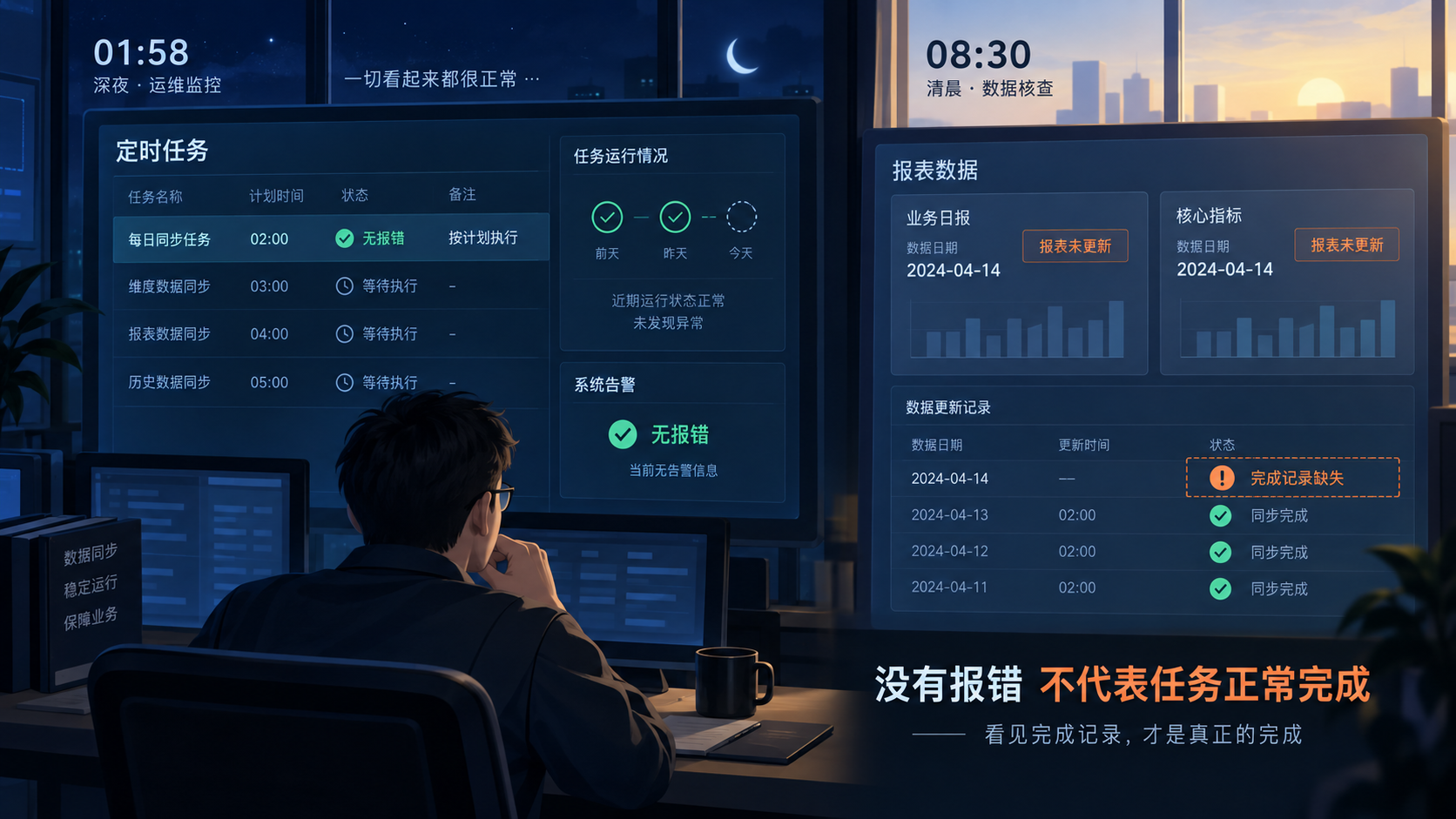
A Quiet On-Call Desk
Xiao Yang is not facing a typical failure alert. Traditional monitoring is good at finding abnormalities that have already appeared: error counts increase, latency stretches, or resource usage crosses a boundary. All of these judgments depend on the system first producing an abnormal data point.
Periodic tasks such as daily syncs, daily summaries, and inspection reports often fail in another way: the scheduler never starts them, a dependency gets stuck halfway, or the result is never delivered. Without a clear failure event, monitoring naturally cannot find an abnormal value to trigger on.
For periodic tasks, a quiet on-call desk only means "no abnormal value has been seen yet." It does not prove that the task has completed.
This is why many teams have monitoring in place, yet the problem is still discovered by the business the next day. What is missing is not a more sensitive threshold, but a way to judge that "the result that should have arrived did not arrive."
The Root Cause Is a Mismatched Observation Target
As Xiao Yang traces backward, he finds that previous rules cared about only two things: whether the task reported an error, and whether the machine became busy. But what the business truly depends on is a third thing: whether the sync completion record appeared on time.
These three things are related, but they cannot replace one another. Error alerts answer "did the system expose a failure?" Metric alerts answer "did the system show a performance abnormality?" Missing detection answers "did the event that was expected to arrive reach the time window?"
When they are mixed together, the most common result is that a task can stop completely without producing an alert. There is no error and no metric fluctuation, only an absent result.
One: Establish the Task Contract First
To detect missing results, the first step is not configuring an alert. It is making "normal completion" specific.
For Xiao Yang's daily sync, this contract can be simple: after daily processing finishes, a specified service should produce a "sync completed" event; the event source, resource type, and resource identifier should distinguish it from other sync tasks; only if it appears within the specified window does this round of delivery count as complete.
This step looks basic, but it decides whether the later judgment can stand. If the scope is too broad, completion events from other tasks may hide the missing target task. If it is too narrow, field or identifier changes after a release may cause false positives.
So matching conditions should follow the task's stable boundary, instead of using a vague "received a sync event" as a substitute. Xiao Yang first needs to confirm which task, source, and resource are delivering which result.
Two: Leave a Time Window for Reality
Once the contract is clear, the second question appears: when can the team say it really did not arrive?
A daily task scheduled to run overnight does not mean an alert should fire the moment the scheduled time arrives. Month-end data volume, queue waiting, and slower upstream responses can all make a normal run later than usual.
Missing detection therefore needs two time concepts: Cron defines the checking cadence, and a grace period allows reasonable delay. Only when no completion event is matched after the "expected check point plus grace period" should this absence be treated as a problem that needs intervention.
A grace period is not safer just because it is longer. If it is too short, normal fluctuation is pushed to on-call engineers. If it is too long, the task may have already affected the morning report while the team is still waiting. The time window should be determined together from historical task duration, dependency paths, and the business usage time.
At this point, Xiao Yang no longer needs to judge by feeling that "it should arrive later." He has a clear, reviewable checking window.
Three: Do Not Let a New Rule Create Noise First
When a rule is newly created, the platform may not yet have seen a normal completion event of this type. If the task has not gone live, is in planned downtime, or the rule was created in advance, immediately checking on a fixed cadence may first produce a meaningless missing alert.
Missing detection therefore also needs an activation boundary. For tasks that are already stable and have a clear delivery rhythm, monitoring can start immediately after the rule is saved. For newly connected tasks or tasks with frequent start-stop changes, it is better to wait until the first matching event arrives before entering normal observation.
This is not just a functional detail. It is a layer of trust control: the platform first confirms that this type of event is actually running, and then judges its later absence.
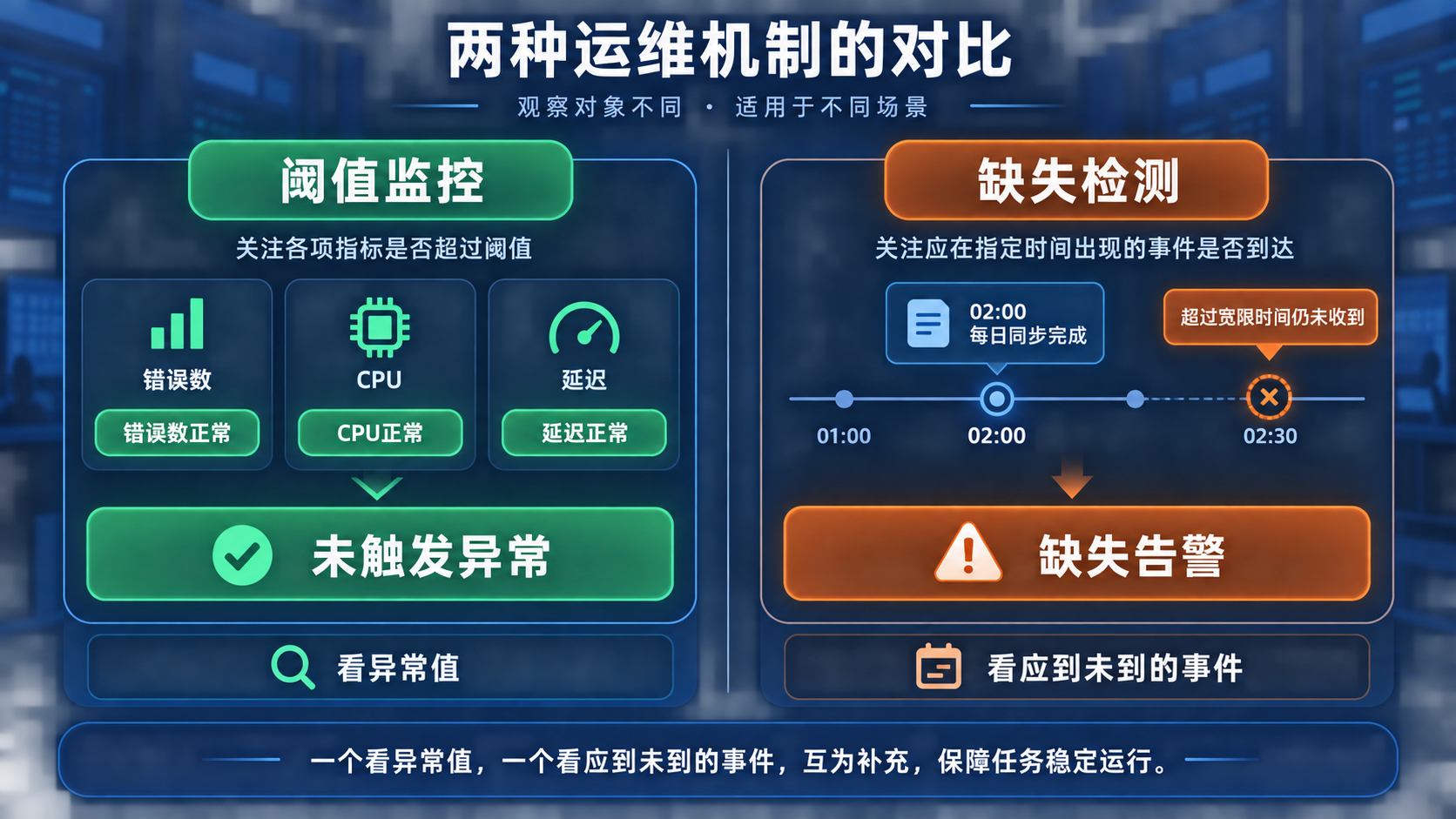
Technical Insight: Missing Is Not Simply "No Data"
Missing detection is easily misunderstood as a generalized no-data alert. The difference is that it does not conclude from seeing no data for a period of time. Instead, it judges around a clear task contract.
- Identifiable: the target is constrained by service, source, resource, and related conditions, instead of mixing all events together.
- Expected: the task has a clear check time and a reasonable grace period, instead of treating any empty window as an incident.
- Recoverable: a later matching completion event can prove that the path has returned to normal observation.
Xiao Yang's daily sync needs this mechanism precisely because its risk is not that "the system suddenly cries out," but that "the business waits for a result that never arrives." By tying event, time, and scope together, missing detection turns a vague instinct into an executable operations judgment.
Close the Alert Loop
Detecting missing results is only the beginning. If the rule creates the same alert again at every check, on-call engineers will quickly be buried in repeated notifications, and they will not know whether this is one ongoing incident or several independent failures.
A more reasonable state flow is: the rule first waits for activation or enters monitoring; after confirming that the target event is missing, it generates an alert; before the task recovers, it does not repeatedly create alerts for the same gap; when a matching event arrives later, the alert automatically recovers and the rule returns to monitoring.
This gives the alert a clear lifeline: it starts when "missing has been confirmed" and ends when "the completion event appears again." In the alert details, Xiao Yang no longer sees a vague red dot, but a task interruption that can be followed up and whose recovery can be verified.
Turn the Judgment Into a Rule
BK Lite Alert Center's correlation rules provide a "missing detection" strategy to cover the gap that traditional threshold monitoring cannot.
It requires configuring target condition groups first, so not all events are included indiscriminately. The team can define the target task by service, alert source, resource type, or resource identifier, then set the Cron check schedule and required grace period, and choose whether to activate immediately or after the first matching event arrives.
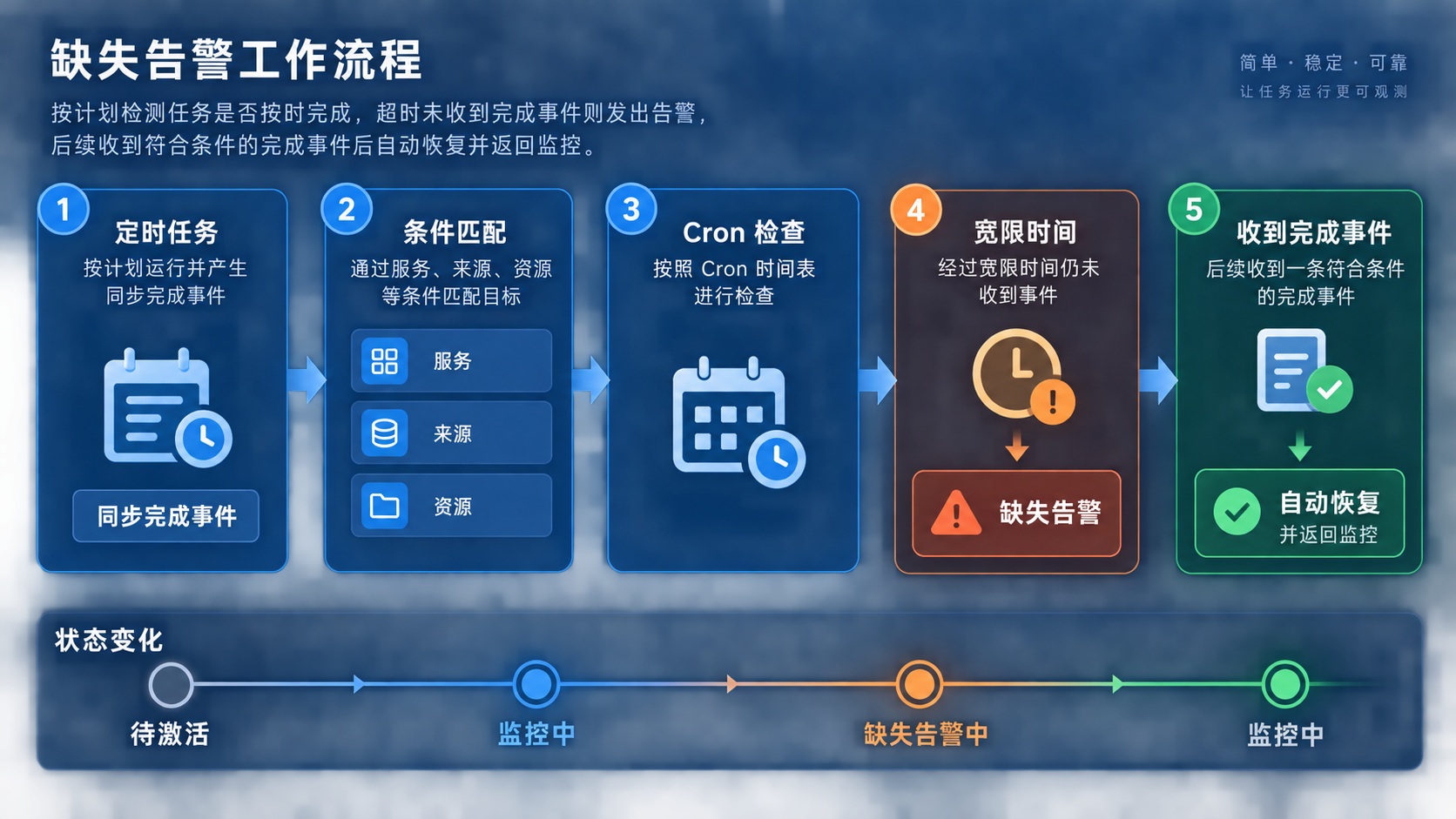
When no matching event is received after the expected time and grace period, the rule generates a missing alert according to the configured name, severity, and summary. Its running state distinguishes waiting for activation, monitoring, and missing alerting, helping operations understand whether the rule is waiting for its first valid event or has confirmed that this round of task delivery has a gap.
After a later matching event is received, the alert automatically recovers and the rule returns to monitoring. It does not rerun the task, backfill data, or replace verification of business data integrity and root cause. Those still need the task owner to continue along scheduling records, execution logs, and dependency paths.
What BK Lite does here is turn "the task did not deliver its result" into a timely, trustworthy, actionable, and recoverable alert, instead of waiting until the business discovers a missing report page and then tracing backward.
Five Questions Before Going Live
Before building missing detection for a key task, use these five questions for a quick self-check:
- What event proves that this task has completed, rather than merely started?
- Which stable fields can accurately define the task scope?
- Does the checking time align with the business usage time?
- Does the grace period account for both normal delay and the acceptable impact window?
- After the alert appears, who is responsible for investigation, rerun, and result confirmation?
The first four questions decide whether the alert is trustworthy. The fifth decides whether it can actually shorten recovery time after it appears.
Make the Result Arrive on Time
Returning to the morning troubleshooting, Xiao Yang still needs to handle why the sync did not complete. But missing detection moves the discovery point from "after the business opens the report" to "after the completion event fails to arrive on time."
That earlier discovery is more than one fewer ticket. It gives operations a clear entry point before business impact spreads: which task did not deliver, when the absence started, and whether the recovery event has returned.
For scheduled tasks, reliability is not only alerting when failure happens. It is also confirming that the expected result actually appears when it is time to deliver.